DynamicFares
Dynamic ticket prices and operating costs for phpVMS 7: revenue and cost model, calculator, audit and a finance hub for pilots.
Dynamische Ticketpreise und Betriebskosten für phpVMS 7: Einnahmen- und Kostenmodell, Rechner, Audit und ein Finance Hub für Piloten.
DynamicFares is donationware: there is no fixed price, you contribute what it is worth to you. The code is private and not passed on without approval. How to get it: see the end of this page.
DynamicFares ist Donationware: Es gibt keinen festen Preis, ihr gebt, was es euch wert ist. Der Code ist privat und wird nicht ohne Zustimmung weitergegeben. So bekommt ihr es: siehe Ende dieser Seite.
What it is
Was es ist
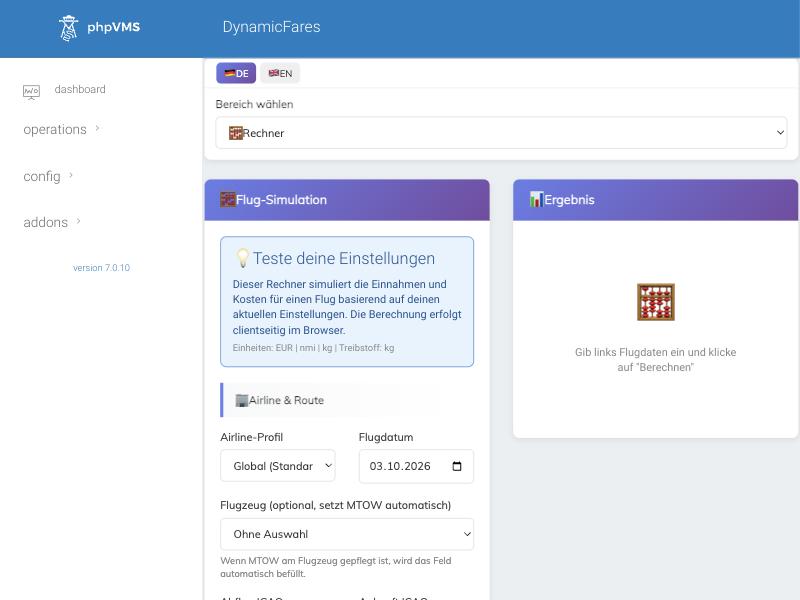
DynamicFares replaces flat ticket prices with a transparent price and cost model. Every PIREP gets realistic revenue (passengers, cargo, upselling) and realistic costs (fuel, airport, crew, navigation, maintenance, aircraft, extras). The Calculator tab lets you test every setting before it affects a real flight, and every formula is documented.
DynamicFares ersetzt pauschale Ticketpreise durch ein nachvollziehbares Preis- und Kostenmodell. Jeder PIREP bekommt realistische Einnahmen (Passagiere, Fracht, Upselling) und realistische Kosten (Treibstoff, Flughafen, Crew, Navigation, Wartung, Flugzeug, Extras). Im Reiter Rechner testet man jede Einstellung, bevor sie einen echten Flug trifft, und jede Formel ist dokumentiert.
- Pilots see fair, plausible prices and a Finance Hub with the airline’s results.
- Administrators steer price level per airline, season, route and airport, and check the result with an audit.
- Piloten sehen faire, plausible Preise und einen Finance Hub mit den Ergebnissen der Airline.
- Administratoren steuern das Preisniveau je Airline, Saison, Strecke und Flughafen und prüfen das Ergebnis mit einem Audit.
The Finance Hub
Der Finance Hub
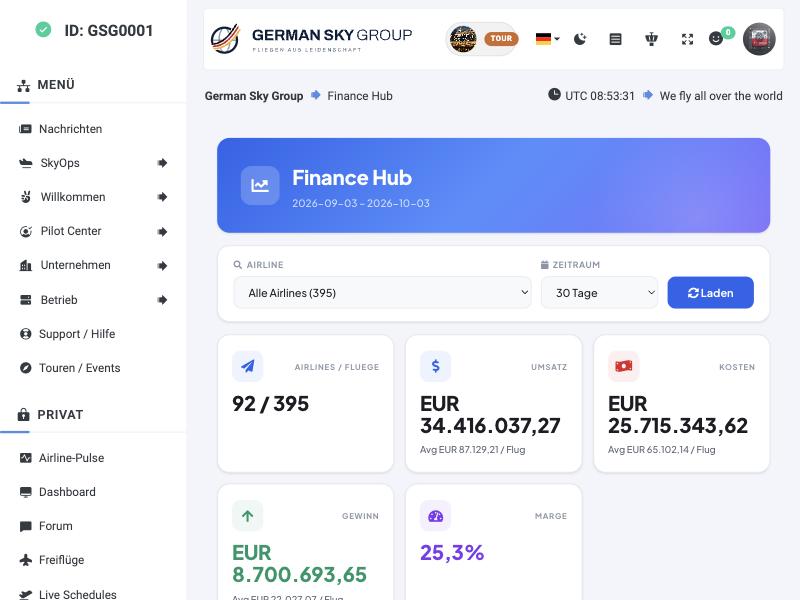
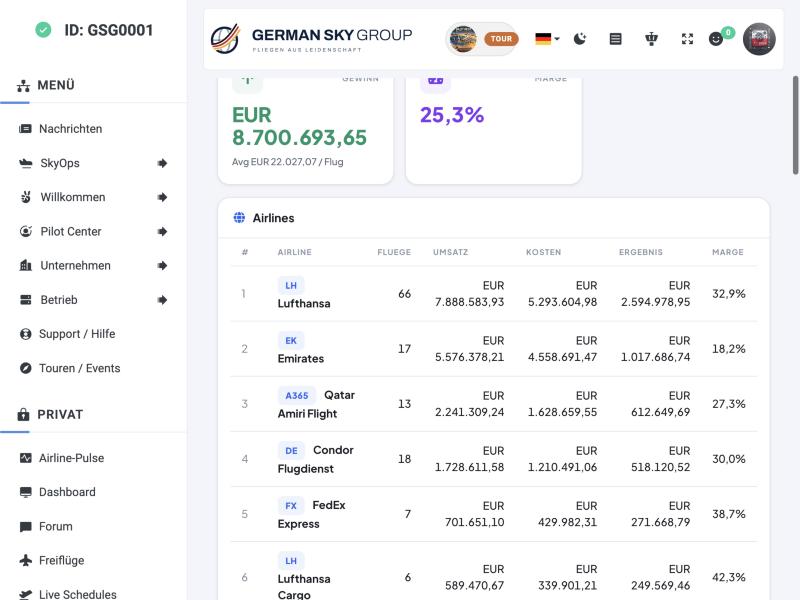
The Finance Hub is the pilot-facing page. Choose an airline (or all) and a period; the page shows how many airlines and flights are included, the revenue, the costs, the profit and the margin, and ranks the airlines by result.
Der Finance Hub ist die Seite für Piloten. Man wählt eine Airline (oder alle) und einen Zeitraum; die Seite zeigt, wie viele Airlines und Flüge enthalten sind, Umsatz, Kosten, Gewinn und Marge und reiht die Airlines nach Ergebnis.
The admin area, tab by tab
Der Admin-Bereich, Reiter für Reiter
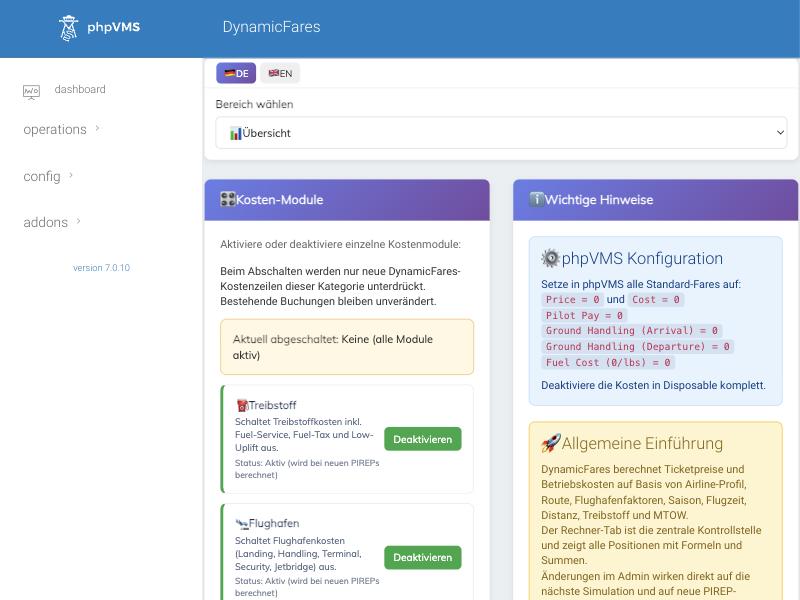
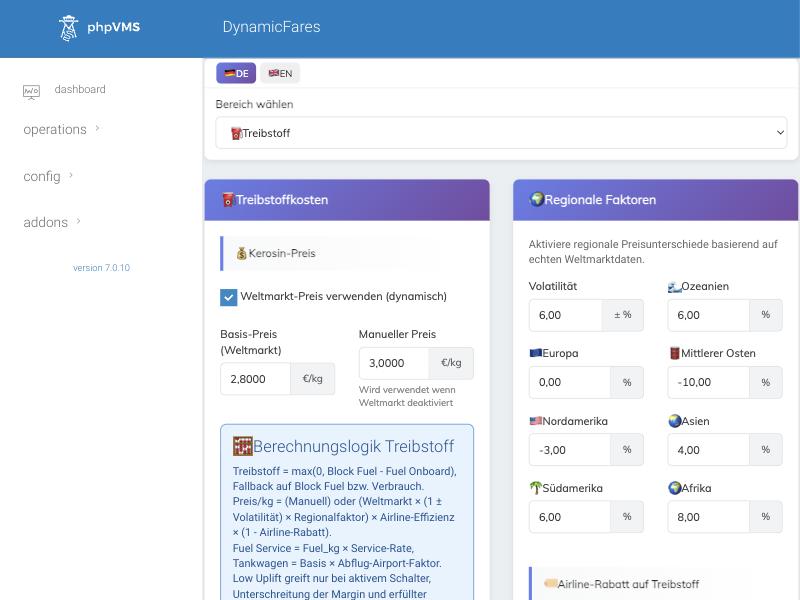
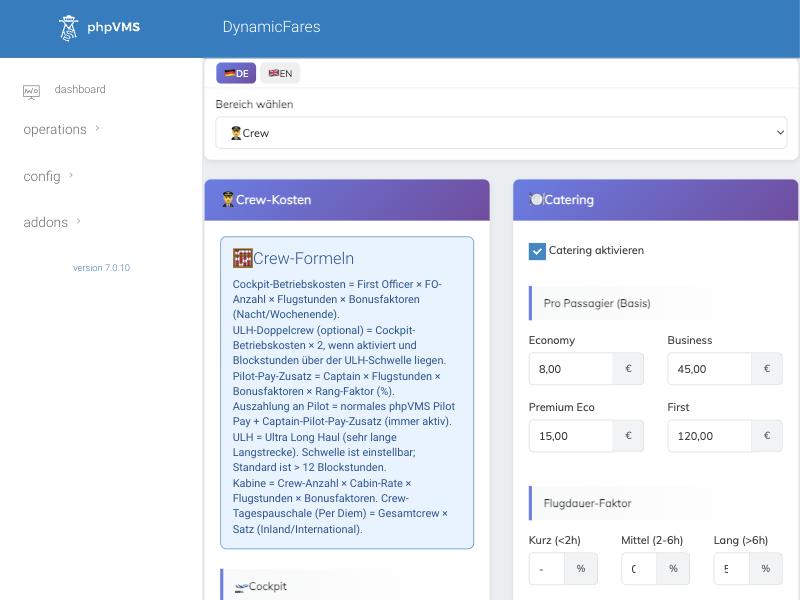
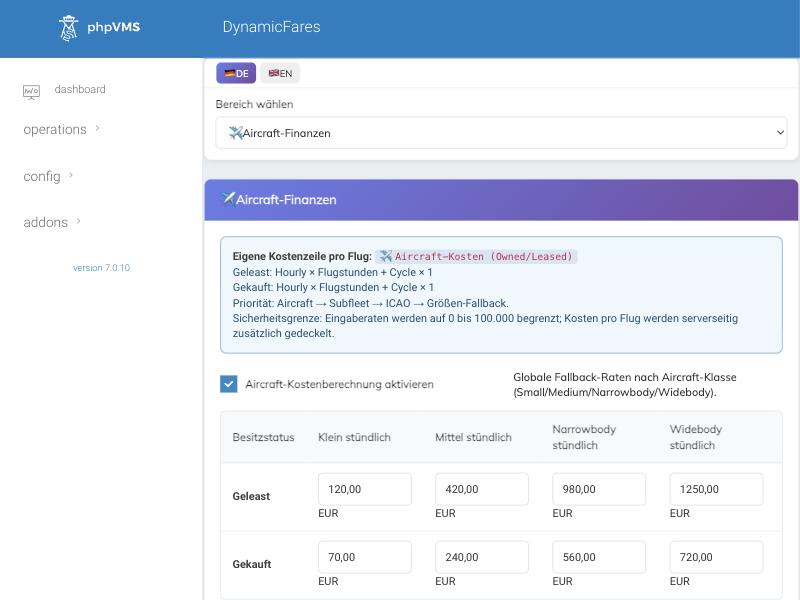
A drop-down chooses the area; the interface switches between German and English. The overview lets you switch whole cost modules on and off (fuel, airport and so on). Existing bookings stay unchanged when you switch a module off.
Ein Auswahlfeld wählt den Bereich; die Oberfläche lässt sich zwischen Deutsch und Englisch umschalten. Die Übersicht schaltet ganze Kostenmodule ein und aus (Treibstoff, Flughafen usw.). Bestehende Buchungen bleiben unverändert, wenn man ein Modul abschaltet.
Revenue
Einnahmen
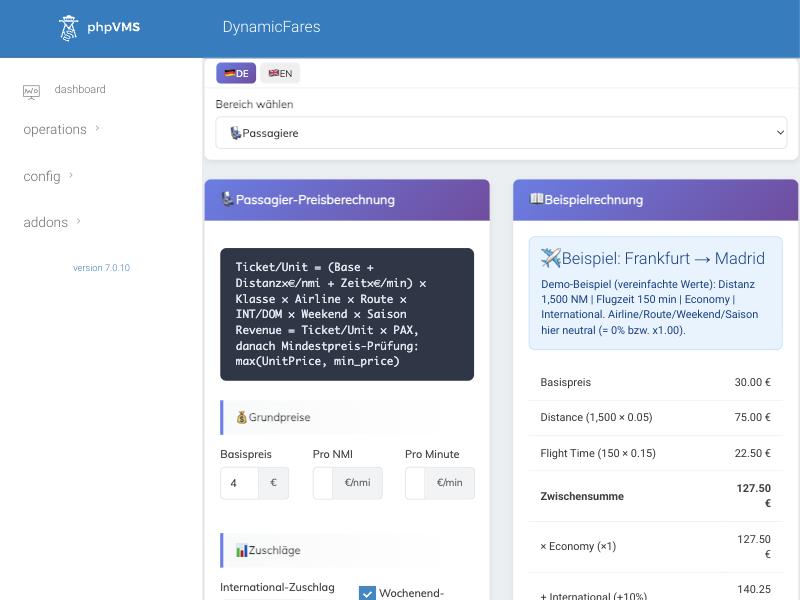
The ticket price per passenger is: (base price + distance × price per nautical mile + time × price per minute) × class × airline × route × international × weekend × season, never below a minimum price. Cargo works the same way per tonne; upselling adds meals, drinks, Wi-Fi, seat, duty-free and baggage.
Der Ticketpreis je Passagier ist: (Basispreis + Entfernung × Preis je Seemeile + Zeit × Preis je Minute) × Klasse × Airline × Strecke × international × Wochenende × Saison, nie unter einem Mindestpreis. Fracht funktioniert genauso je Tonne; Upselling ergänzt Essen, Getränke, WLAN, Sitzplatz, Duty-free und Gepäck.
Costs
Kosten
Steering the price level
Das Preisniveau steuern
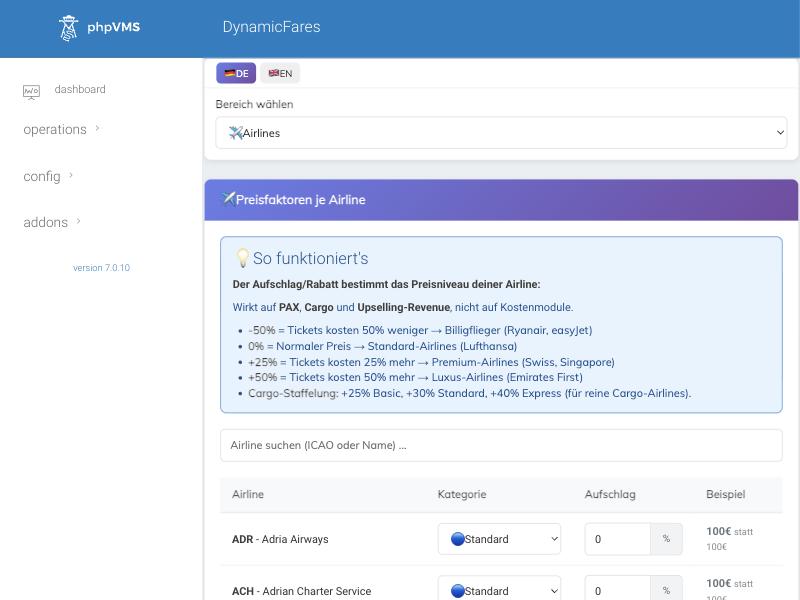
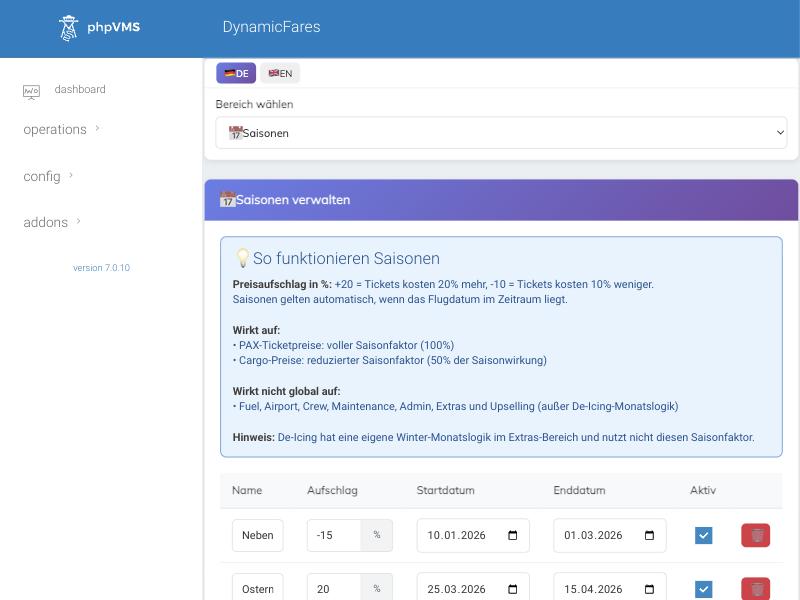
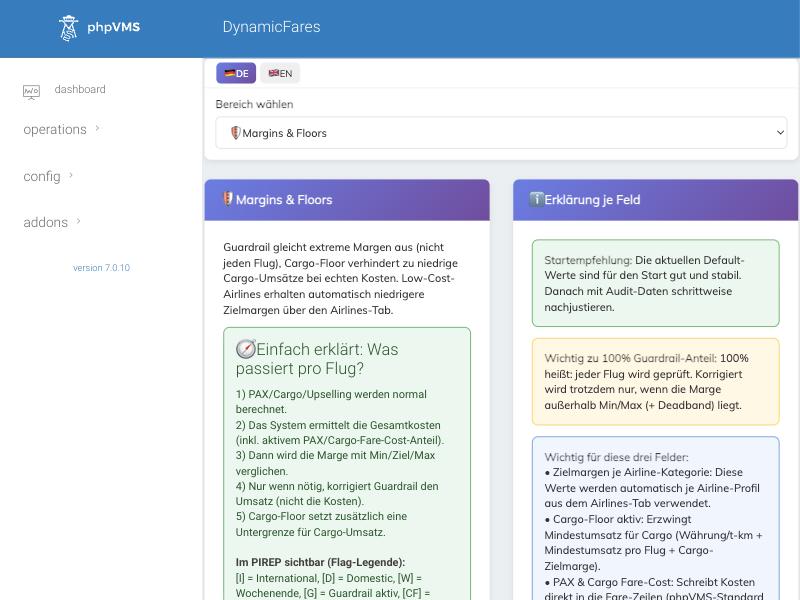
Checking the result
Das Ergebnis prüfen
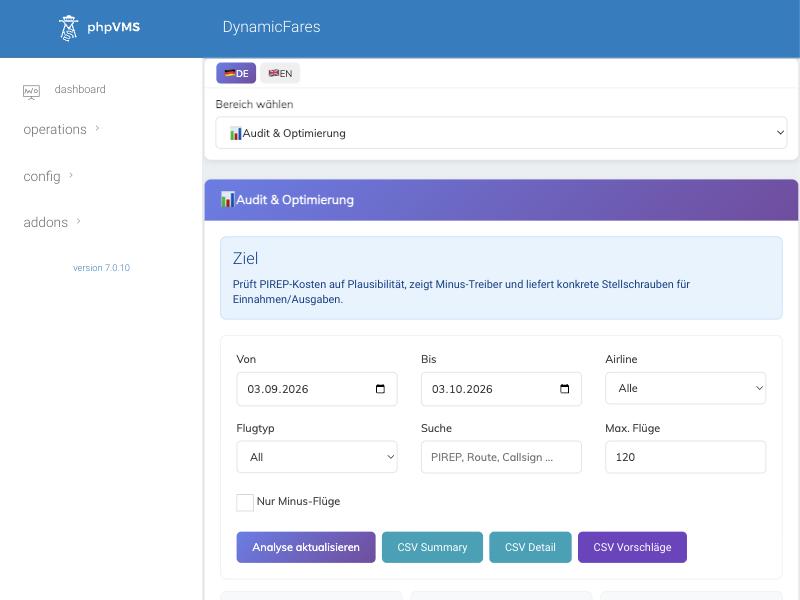
Further tabs: cargo, airport fees, routes (percentage up or down per route), airport categories with manual overrides, upselling, other costs (navigation, maintenance, admin, extras) and a settings backup you can download.
Weitere Reiter: Fracht, Flughafengebühren, Strecken (Prozent rauf oder runter je Strecke), Flughafen-Kategorien mit manuellen Überschreibungen, Upselling, weitere Kosten (Navigation, Wartung, Admin, Extras) und ein Einstellungs-Backup zum Herunterladen.
Installing it and avoiding the usual trap
Installation und die übliche Falle
| Step | What to do |
|---|---|
| 1 | Back up your current modules/DynamicFares folder (if you update). |
| 2 | Upload the folder via FTP, replacing the old one completely. |
| 3 | Run the phpVMS updater at /update. |
| 4 | Open /admin/dynamicfares, run the System check and repair if offered. |
| 5 | Test: use “Recalculate Finances” on one passenger PIREP and one cargo PIREP. |
| Schritt | Was zu tun ist |
|---|---|
| 1 | Den bisherigen Ordner modules/DynamicFares sichern (bei einem Update). |
| 2 | Den Ordner per FTP hochladen und den alten komplett ersetzen. |
| 3 | Den phpVMS-Updater unter /update ausführen. |
| 4 | /admin/dynamicfares öffnen und die Systemprüfung samt Reparatur ausführen, falls angeboten. |
| 5 | Testen: „Recalculate Finances“ auf einem Passagier- und einem Fracht-PIREP ausführen. |
Never leave a numeric cost or factor field empty. Enter 0. Under PHP 8 an empty value breaks the multiplication and the PIREP submit or the recalculation fails. In phpVMS itself set the default fares and costs to 0 and switch off the costs in Disposable, otherwise they are counted twice.
Numerische Kosten- und Faktorfelder nie leer lassen. 0 eintragen. Unter PHP 8 bricht ein leerer Wert die Multiplikation, und PIREP-Abgabe oder Neuberechnung schlagen fehl. In phpVMS selbst die Standard-Fares und -Kosten auf 0 setzen und die Kosten in Disposable abschalten, sonst zählt alles doppelt.
Requirements: phpVMS 7.0.5 or newer, PHP 8.1 or newer. InnoDB is recommended.
Voraussetzungen: phpVMS 7.0.5 oder neuer, PHP 8.1 oder neuer. InnoDB wird empfohlen.
Getting this module
So bekommst du dieses Modul
This module is available against a donation. There is no fixed price. The way is the same for every donation module:
Dieses Modul gibt es gegen eine Spende. Es gibt keinen festen Preis. Der Weg ist für alle Spenden-Module derselbe:
- Contact Thomas on DiscordMessage
thomas_kant_38518and tell him which module you want. - Donate via PayPalSend your donation to
cloud@kant.ovh, as PayPal “Friends”. - Add your GitHub user nameWrite your GitHub user name in the payment note, so we can match the payment to you.
- Auf Discord meldenSchreibt Thomas an:
thomas_kant_38518, und sagt ihm, welches Modul ihr wollt. - Per PayPal spendenSchickt eure Spende an
cloud@kant.ovh, als PayPal „Friends“ (Freunde). - GitHub-Benutzernamen angebenSchreibt euren GitHub-Benutzernamen in den Verwendungszweck, damit wir die Zahlung euch zuordnen können.