Live Map
VATSIM and IVAO live map for phpVMS 7 with your own flights, controller sectors, weather and an admin page.
VATSIM- und IVAO-Live-Map für phpVMS 7 mit euren eigenen Flügen, Controller-Sektoren, Wetter und einer Admin-Seite.
What it is
Was es ist
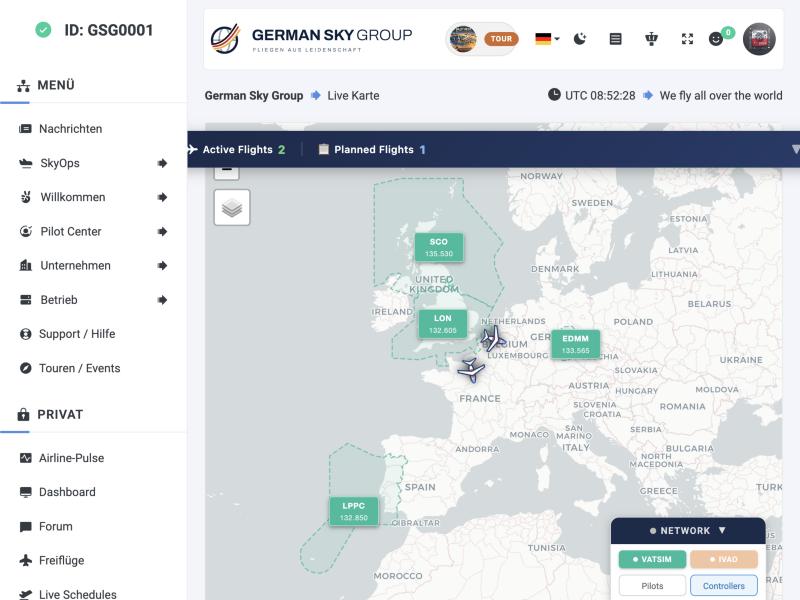
The Live Map shows your own flights and the VATSIM and IVAO network on one interactive map inside your phpVMS site. Pilots see where your airline is flying right now, which sectors are staffed, and the weather on the route. Everything is set up in one admin page.
Die Live Map zeigt eure eigenen Flüge und das VATSIM- und IVAO-Netzwerk auf einer interaktiven Karte in eurer phpVMS-Seite. Piloten sehen, wo eure Airline gerade fliegt, welche Sektoren besetzt sind und wie das Wetter auf der Strecke ist. Alles wird auf einer Admin-Seite eingestellt.
What pilots get
Was Piloten bekommen
- VA flights: a panel with active and planned flights; on phones one “Flights” button.
- Follow mode: the map follows one flight or fits all active aircraft.
- Network: VATSIM and IVAO pilots and controllers, FIR and UIR sectors drawn from VATSpy data; Pacific sectors are shown whole across the date line.
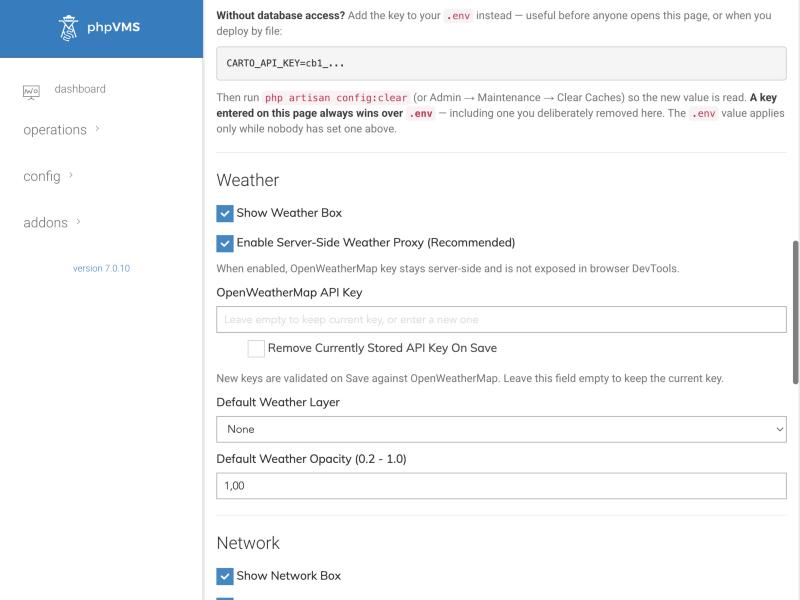
- Weather: optional weather layers from OpenWeatherMap. A server-side proxy keeps your key out of the browser.
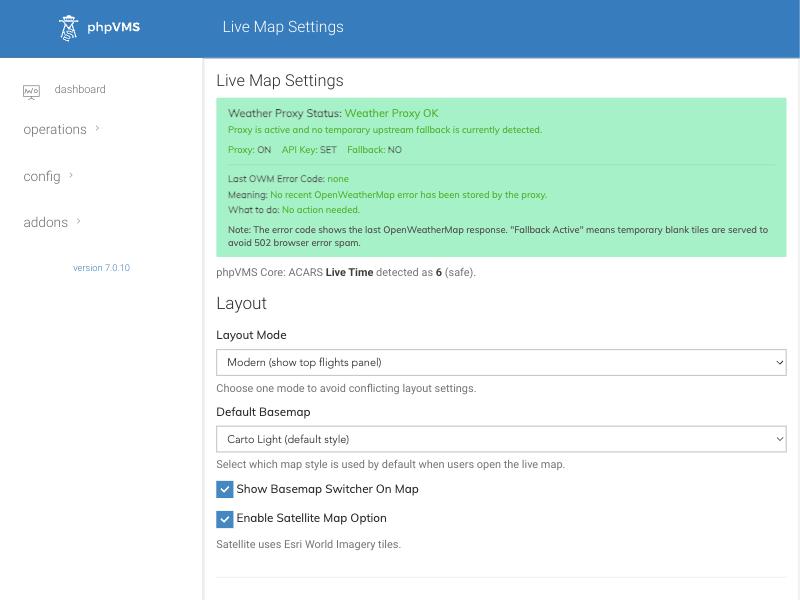
- Basemaps: CARTO light and dark, OpenStreetMap and satellite, with a switcher on the map.
- Clean data: positions at 0/0 are ignored, and the route line to the destination crosses the date line instead of wrapping around the world.
- VA-Flüge: ein Panel mit aktiven und geplanten Flügen; am Handy ein „Flights“-Knopf.
- Folgen-Modus: Die Karte folgt einem Flug oder zeigt alle aktiven Flugzeuge.
- Netzwerk: VATSIM- und IVAO-Piloten und -Controller, FIR- und UIR-Sektoren aus VATSpy-Daten; pazifische Sektoren erscheinen über die Datumsgrenze hinweg ganz.
- Wetter: optionale Wetterebenen von OpenWeatherMap. Ein Server-Proxy hält euren Schlüssel aus dem Browser heraus.
- Grundkarten: CARTO hell und dunkel, OpenStreetMap und Satellit, mit Umschalter auf der Karte.
- Saubere Daten: Positionen bei 0/0 werden ignoriert, und die Routenlinie zum Ziel läuft über die Datumsgrenze statt um die ganze Welt.
The settings page
Die Einstellungsseite
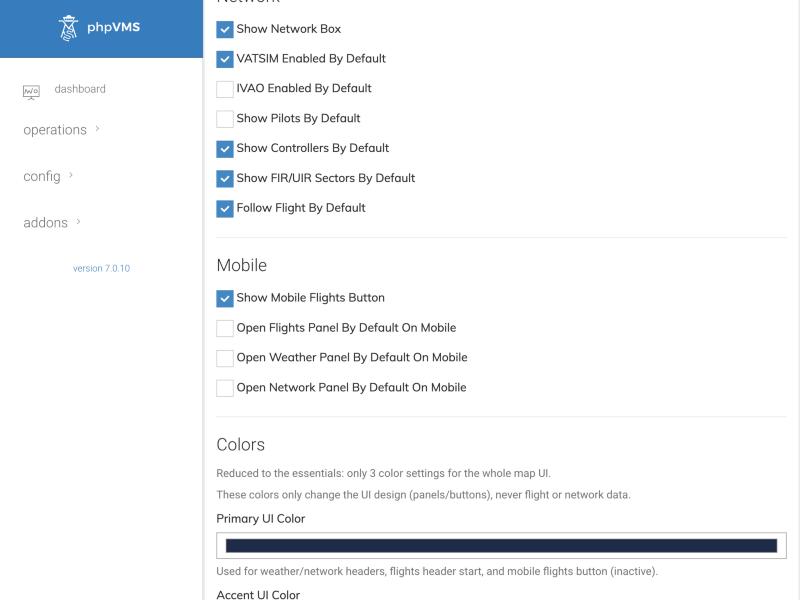
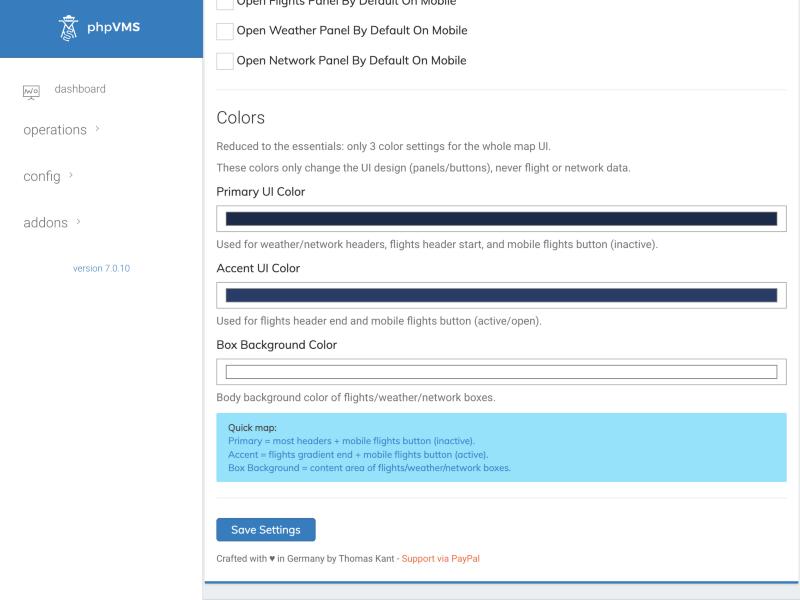
Everything is configured under /admin/livemap. At the top a status box tells you whether the weather proxy works, which OpenWeatherMap error occurred last and what to do about it.
Alles wird unter /admin/livemap eingestellt. Oben sagt eine Statusbox, ob der Wetter-Proxy läuft, welcher OpenWeatherMap-Fehler zuletzt auftrat und was zu tun ist.
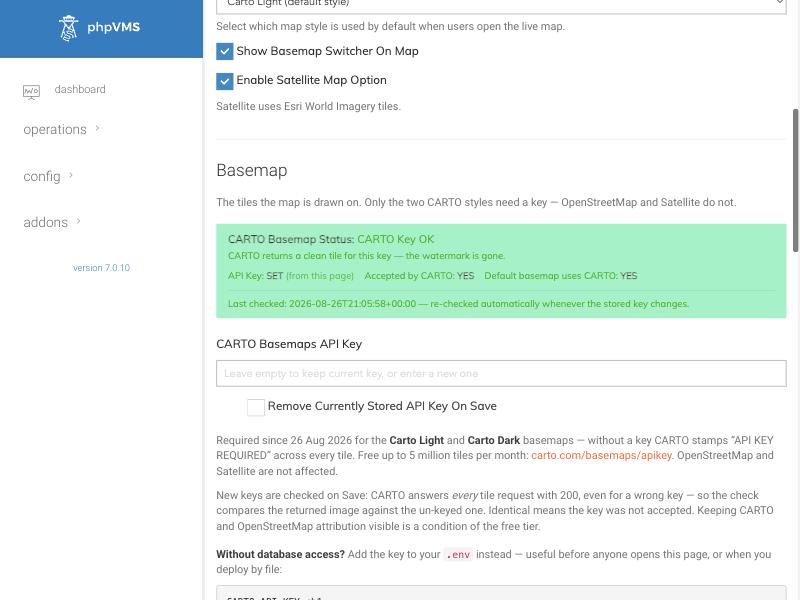
Important since 26 August 2026: the two CARTO basemaps need a free API key (up to 5 million tiles per month). Without it CARTO stamps “API key required” on every tile. The page checks a new key when you save, and the status box shows whether CARTO accepts it. OpenStreetMap and satellite need no key.
Wichtig seit dem 26. August 2026: Die beiden CARTO-Grundkarten brauchen einen kostenlosen API-Schlüssel (bis 5 Millionen Kacheln pro Monat). Ohne ihn stempelt CARTO „API key required“ auf jede Kachel. Die Seite prüft einen neuen Schlüssel beim Speichern, die Statusbox zeigt, ob CARTO ihn akzeptiert. OpenStreetMap und Satellit brauchen keinen Schlüssel.
Installing it, step by step
Installation, Schritt für Schritt
| Step | What to do |
|---|---|
| 1 | Install the full package (module and widget files must have the same version). |
| 2 | Copy the folder LiveMap/ to modules/LiveMap/. |
| 3 | Copy all three widget files (live_map, live_map_styles, live_map_scripts as .blade.php) into the widgets folder of your theme (SPTheme or Disposable_v3). |
| 4 | Open /update, then Admin → Maintenance → Clear Caches. |
| 5 | Configure everything under /admin/livemap. |
| Schritt | Was zu tun ist |
|---|---|
| 1 | Das Gesamtpaket installieren (Modul und Widget-Dateien müssen dieselbe Version haben). |
| 2 | Den Ordner LiveMap/ nach modules/LiveMap/ kopieren. |
| 3 | Alle drei Widget-Dateien (live_map, live_map_styles, live_map_scripts als .blade.php) in den Widget-Ordner eures Themes kopieren (SPTheme oder Disposable_v3). |
| 4 | /update aufrufen, danach Admin → Maintenance → Clear Caches. |
| 5 | Alles unter /admin/livemap einstellen. |
Replacing only one of the three widget files is the most common cause of a map that “loads and loads”. Always update all three together.
Nur eine der drei Widget-Dateien zu ersetzen ist die häufigste Ursache für eine Karte, die „ewig lädt“. Immer alle drei zusammen aktualisieren.