SkyAdventures & PaxStudio
Two phpVMS 7 modules that turn a list of flights into something pilots want to come back to: tours and events with a goal, and a proper dispatch desk to plan every leg. This guide shows both with screenshots from our live system, so you can judge what they would do for your virtual airline.
SkyAdventures & PaxStudio
Zwei phpVMS-7-Module, die aus einer Flugliste etwas machen, zu dem Piloten gern zurückkommen: Touren und Events mit einem Ziel und ein richtiger Dispatch-Platz, an dem jede Etappe geplant wird. Diese Anleitung zeigt beide mit Bildern aus unserem Live-System, damit ihr als VA-Administratoren vorab beurteilen könnt, was sie für eure Airline leisten.
Both modules are not free. They are given to other virtual airlines against a donation. How to get them: see the end of this page.
Beide Module sind nicht kostenlos. Sie werden an andere Virtuelle Airlines gegen eine Spende abgegeben. So bekommt ihr sie: siehe Ende dieser Seite.
Who does what
SkyAdventures
Gives flying a purpose. Tours with several legs, events and fly-ins to a common destination, a progress display, a map, a photo gallery and patches as rewards. It answers the question “what should I fly next, and why?”
PaxStudio
Plans the actual flight. The pilot picks the aircraft, sets passengers and cargo on a loadsheet, and PaxStudio hands that load to SimBrief and builds the OFP. It answers the question “how do I fly this leg?”
They work well alone. Together they form one path from “I like this tour” to “my flight is planned and counted towards the tour”.
Wer macht was
SkyAdventures
Gibt dem Fliegen ein Ziel. Touren mit mehreren Etappen, Events und Sternflüge zu einem gemeinsamen Ziel, Fortschrittsanzeige, Karte, Fotogalerie und Patches als Belohnung. Es beantwortet die Frage „Was fliege ich als Nächstes, und warum?“
PaxStudio
Plant den eigentlichen Flug. Der Pilot wählt das Flugzeug, stellt Passagiere und Fracht auf einem Loadsheet ein, PaxStudio gibt die Beladung an SimBrief weiter und baut das OFP. Es beantwortet die Frage „Wie fliege ich diese Etappe?“
Beide funktionieren auch einzeln. Zusammen ergeben sie einen durchgehenden Weg von „Diese Tour gefällt mir“ bis „Mein Flug ist geplant und zählt für die Tour“.
The pilot’s path in seven steps
The colours show which module you are in.
Der Weg des Piloten in sieben Schritten
Die Farben zeigen, in welchem Modul man gerade ist.
- Pick a tour or event SkyAdventuresBrowse the offers, read the story, sign up.
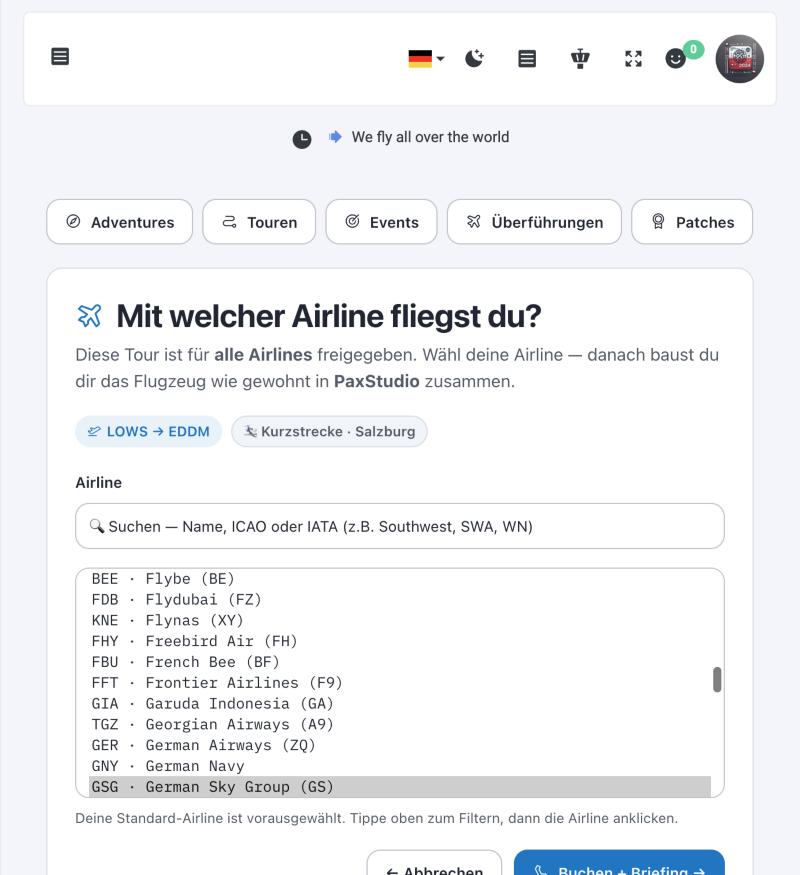
- Choose a leg and an airline SkyAdventuresEvery leg is a boarding pass. “Book + briefing” asks for the airline and creates a real phpVMS booking.
- Open the PaxStudio hub PaxStudioThe booking shows up there with the status “OFP pending”.
- Choose the aircraft and the load PaxStudioLoadsheet: aircraft, passengers, cargo, weights.
- Get the flight plan PaxStudioPaxStudio sends the load to SimBrief, or imports the pilot’s own SimBrief plan.
- Fly and file the PIREP ACARSWith the ACARS client the pilot normally uses.
- The leg counts SkyAdventuresThe accepted PIREP is matched to the leg. Progress, map and patch update by themselves.
- Tour oder Event aussuchen SkyAdventuresAngebote ansehen, Geschichte lesen, anmelden.
- Etappe und Airline wählen SkyAdventuresJede Etappe ist ein Boarding-Pass. „Buchen + Briefing“ fragt die Airline ab und legt eine echte phpVMS-Buchung an.
- PaxStudio-Hub öffnen PaxStudioDie Buchung erscheint dort mit dem Status „OFP ausstehend“.
- Flugzeug und Beladung wählen PaxStudioLoadsheet: Flugzeug, Passagiere, Fracht, Gewichte.
- Flugplan holen PaxStudioPaxStudio übergibt die Beladung an SimBrief oder importiert den eigenen SimBrief-Plan des Piloten.
- Fliegen und PIREP abgeben ACARSMit dem ACARS-Client, den der Pilot ohnehin nutzt.
- Die Etappe zählt SkyAdventuresDer akzeptierte PIREP wird der Etappe zugeordnet. Fortschritt, Karte und Patch aktualisieren sich von selbst.
SkyAdventures
Tours, events, fly-ins and patches for phpVMS 7. Version 0.68 runs on our live system.
The start page
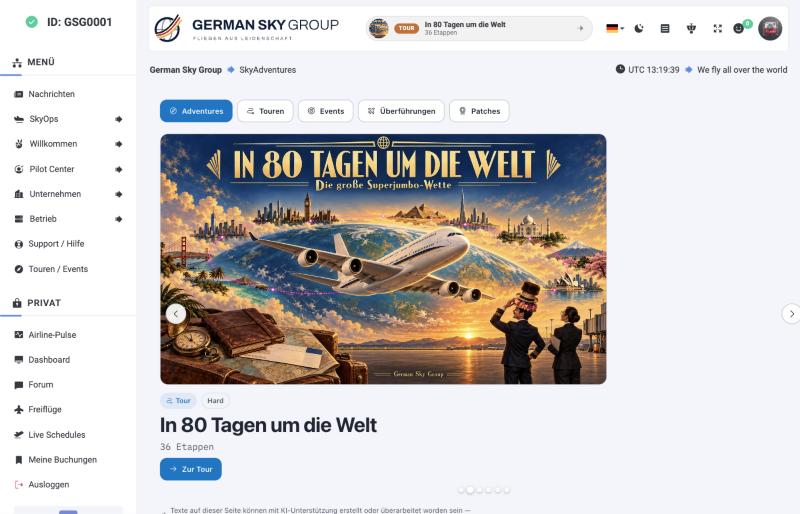
Everything starts at one page with five tabs: Adventures (the highlights), Tours, Events, Transfers and Patches. Each offer has a banner, a difficulty and the number of legs.
SkyAdventures
Touren, Events, Sternflüge und Patches für phpVMS 7. Auf unserem Live-System läuft Version 0.68.
Die Startseite
Alles beginnt auf einer Seite mit fünf Reitern: Adventures (die Highlights), Touren, Events, Überführungen und Patches. Jedes Angebot hat ein Banner, einen Schwierigkeitsgrad und die Zahl der Etappen.
Tours and events: what is the difference?
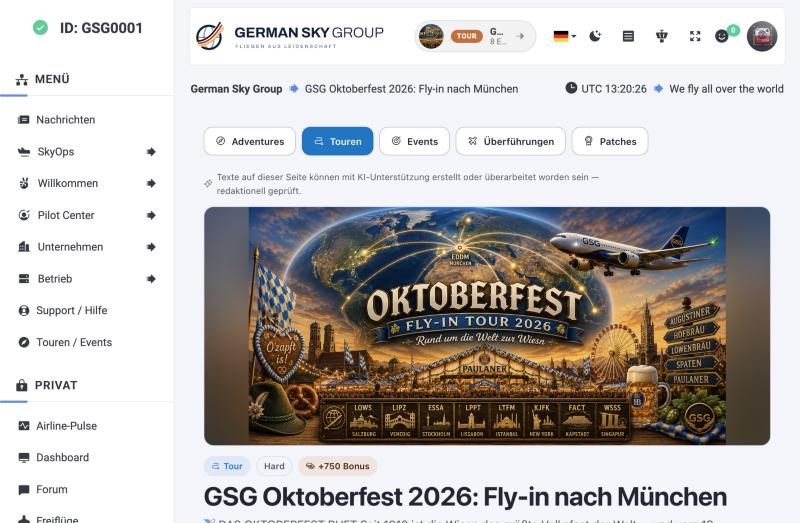
- Tour: a longer series of legs a pilot flies at their own pace, within a time window. Example: 8 legs to Munich during Oktoberfest.
- Event: a date-bound happening, often a fly-in (many starting points, one destination) or a VATSIM/IVAO event.
- Series: several tours combined, with a bonus patch for the whole series.
- Completion rule: you decide per tour. All legs, “X of Y” or “one is enough”.
Tour oder Event: wo liegt der Unterschied?
- Tour: eine längere Folge von Etappen, die jeder im eigenen Tempo innerhalb eines Zeitfensters fliegt. Beispiel: 8 Etappen nach München zum Oktoberfest.
- Event: ein Termin, oft ein Sternflug (viele Startorte, ein Ziel) oder ein VATSIM-/IVAO-Event.
- Serie: mehrere Touren zusammengefasst, mit einem Zusatz-Patch für die ganze Serie.
- Abschlussregel: legt ihr je Tour fest. Alle Etappen, „X von Y“ oder „eine genügt“.
A tour page
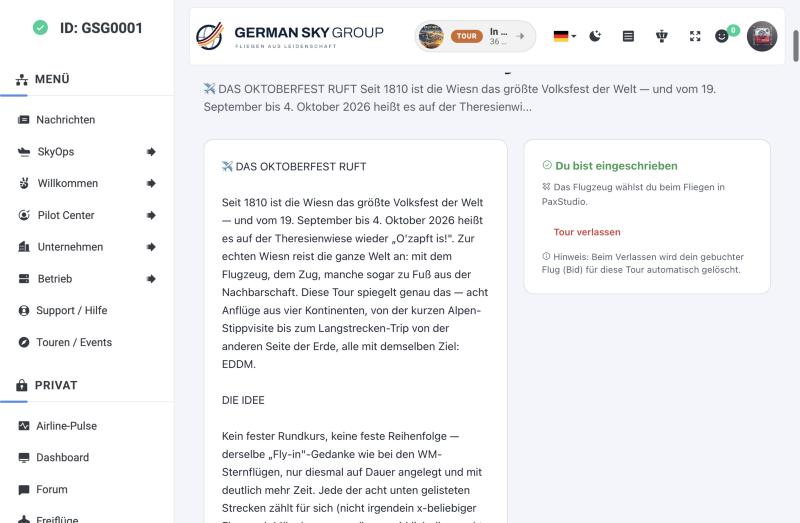
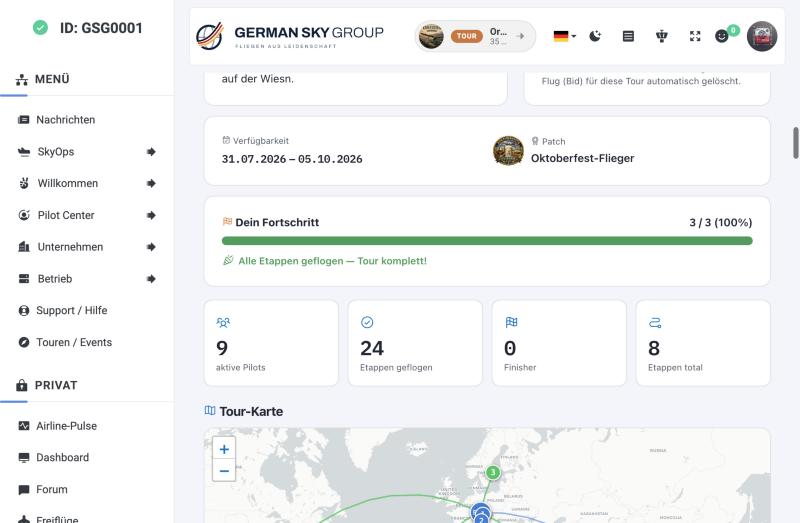
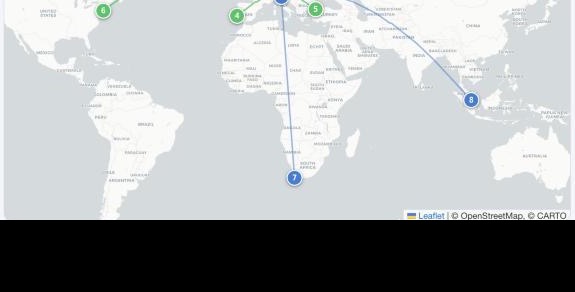
The tour page tells the story, shows the availability window, the patch to win and the pilot’s own progress.
Eine Tour-Seite
Die Tour-Seite erzählt die Geschichte, nennt den Zeitraum, den Patch als Preis und den eigenen Fortschritt des Piloten.
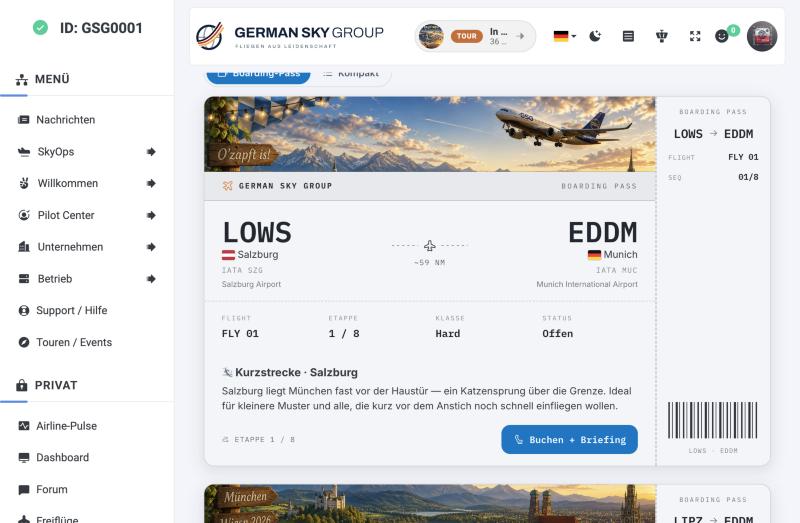
The legs as boarding passes
Each leg has a story, a class (short, medium, long haul), a route and a status. One click on Book + briefing starts the booking.
Die Etappen als Boarding-Pässe
Jede Etappe hat eine Geschichte, eine Klasse (Kurz-, Mittel-, Langstrecke), eine Route und einen Status. Ein Klick auf Buchen + Briefing startet die Buchung.
Patches
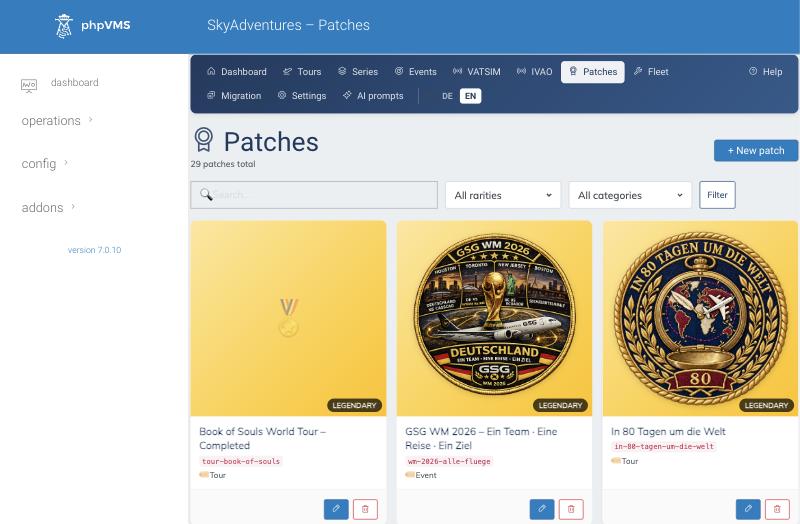
Every tour and event can award a patch with a rarity (up to “Legendary”). For each patch SkyAdventures creates the matching phpVMS award by itself, including the image, so you never maintain awards twice.
Patches
Jede Tour und jedes Event kann einen Patch mit Seltenheit (bis „Legendary“) vergeben. Zu jedem Patch legt SkyAdventures automatisch den passenden phpVMS-Award samt Bild an, ihr pflegt Auszeichnungen also nicht doppelt.
Transfers and maintenance flights
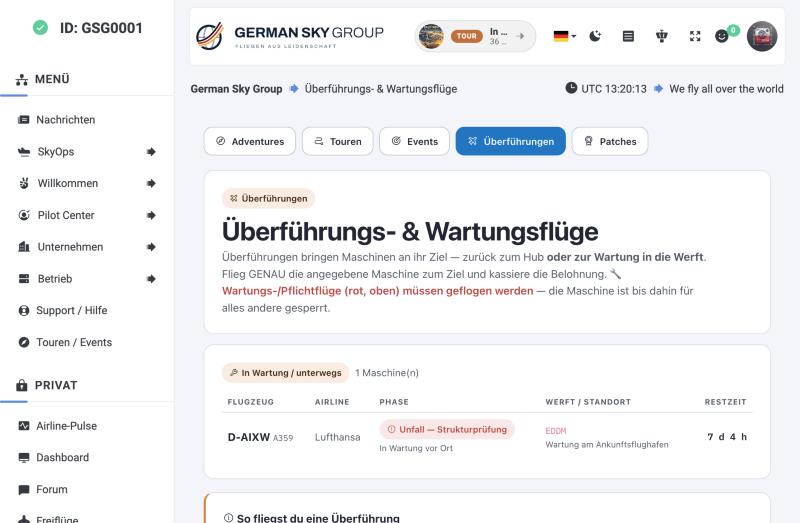
A separate tab lists transfer (ferry) and maintenance flights: aircraft that must go to a shipyard or back to the hub. The pilot books exactly that aircraft and earns a reward on top of the normal pay.
Experimental. The fleet, maintenance and transfer area is not finished yet. It writes aircraft status into the core and it requires PaxStudio. Use it on a production system only with a backup. Tours, events and patches do not depend on it.
Überführungen und Wartungsflüge
Ein eigener Reiter listet Überführungs- und Wartungsflüge: Flugzeuge, die zur Werft oder zurück zum Hub müssen. Der Pilot bucht genau diese Maschine und bekommt zusätzlich zur normalen Bezahlung eine Belohnung.
Experimentell. Der Bereich Flotte, Wartung und Überführungen ist noch nicht fertig. Er schreibt den Flugzeugstatus in den Kern und braucht PaxStudio. Nur mit Backup auf einem Produktivsystem einsetzen. Touren, Events und Patches hängen nicht davon ab.
PaxStudio
The dispatch desk. It replaces the basic phpVMS SimBrief page with a loadsheet, a flight dashboard and a clean hand-over to SimBrief. Version 2.15 runs on our live system.
Why it exists
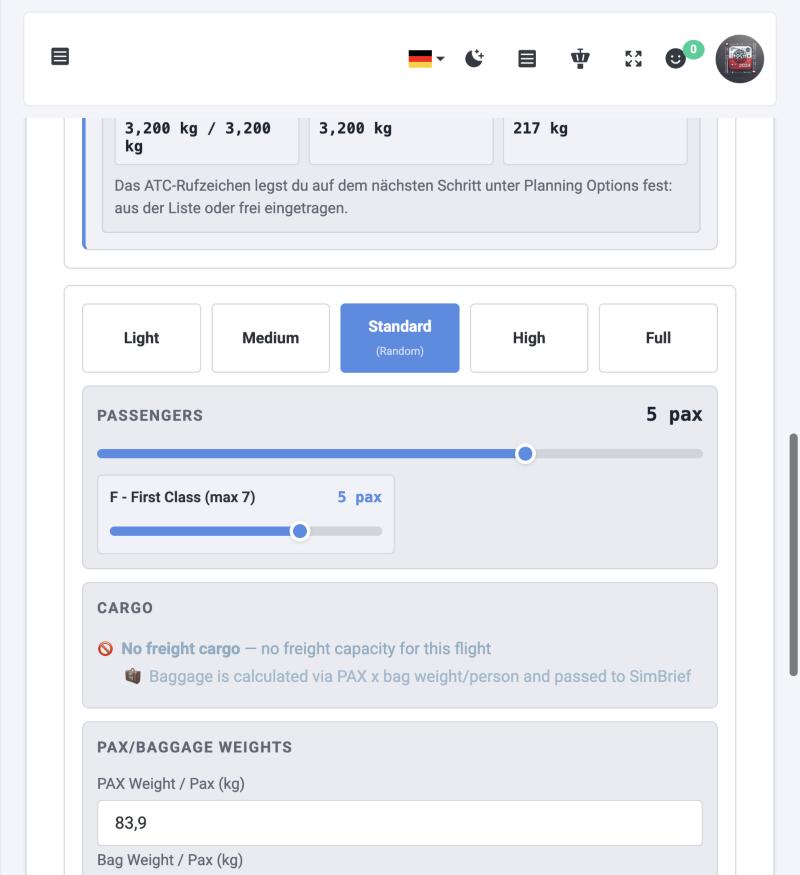
PaxStudio reads the certified weights from the SimBrief airframe profile, lets the pilot set passengers and cargo within the limits of the chosen aircraft, and sends exactly that load to SimBrief. Pilots who prefer to plan in SimBrief themselves can import their own plan instead.
PaxStudio
Der Dispatch-Platz. Er ersetzt die einfache phpVMS-SimBrief-Seite durch ein Loadsheet, ein Flug-Dashboard und eine saubere Übergabe an SimBrief. Auf unserem Live-System läuft Version 2.15.
Warum es das gibt
PaxStudio liest die zertifizierten Gewichte aus dem SimBrief-Airframe-Profil, lässt den Piloten Passagiere und Fracht innerhalb der Grenzen des gewählten Flugzeugs einstellen und schickt genau diese Beladung an SimBrief. Wer lieber selbst in SimBrief plant, kann stattdessen seinen eigenen Plan importieren.
The hub
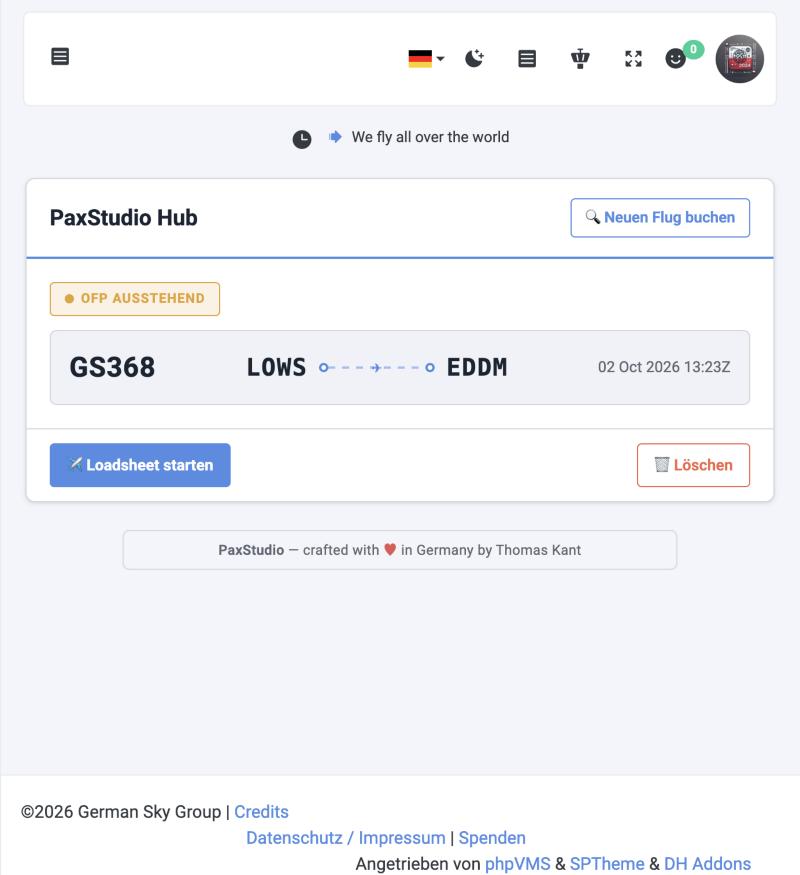
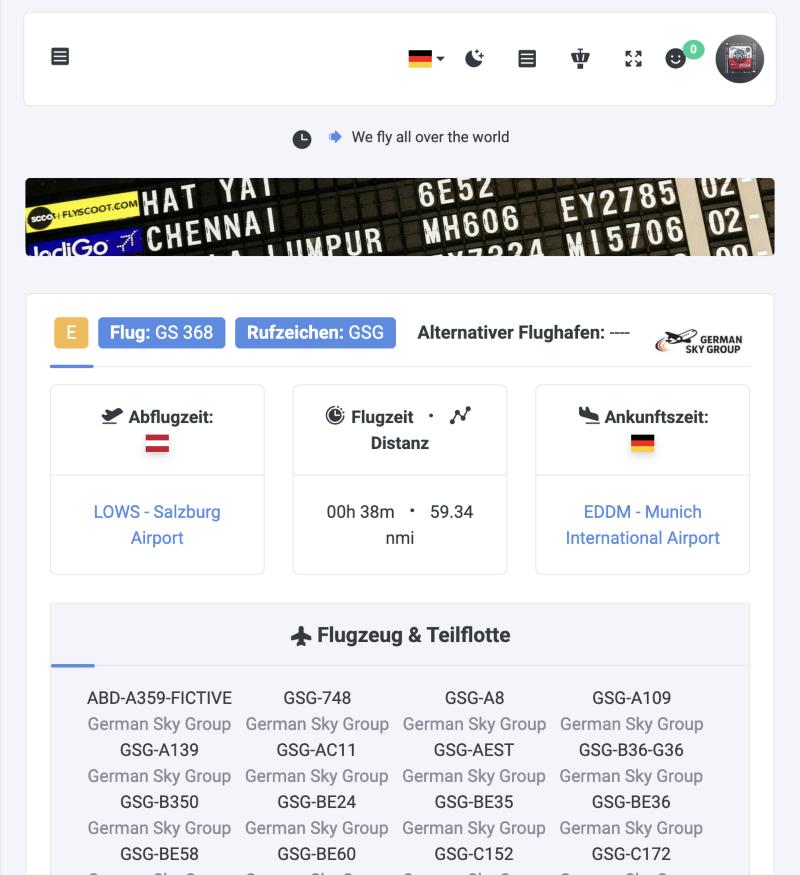
The hub shows the pilot’s current booking. Below you see a leg of the Oktoberfest tour, booked a minute earlier in SkyAdventures: the status is “OFP pending”, and the pilot starts the loadsheet from here or removes the booking.
Der Hub
Der Hub zeigt die aktuelle Buchung des Piloten. Unten seht ihr eine Etappe der Oktoberfest-Tour, eine Minute zuvor in SkyAdventures gebucht: Status „OFP ausstehend“. Von hier startet der Pilot das Loadsheet oder löscht die Buchung.
The loadsheet
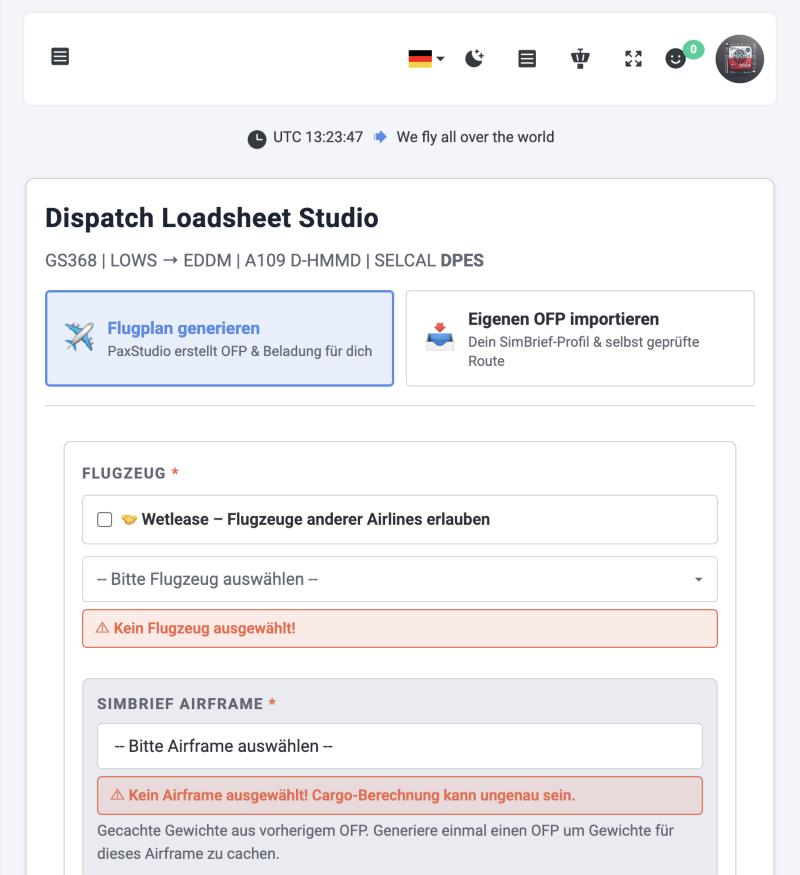
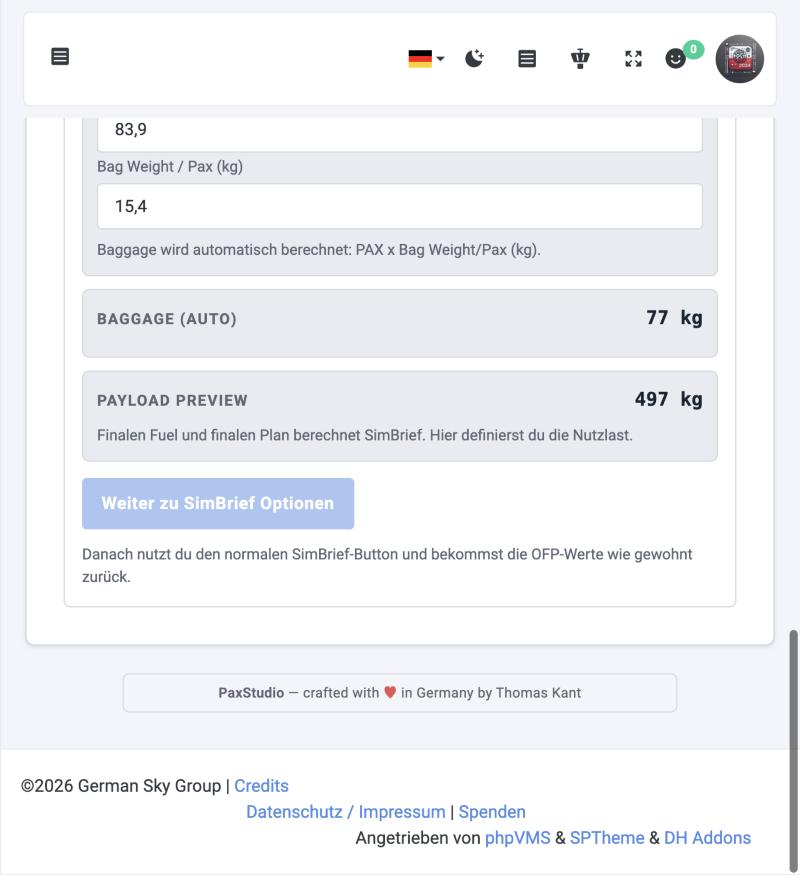
The loadsheet studio is the heart of PaxStudio. The header shows flight, route, aircraft registration and SELCAL. The pilot chooses between two ways to get a flight plan:
- Generate flight plan: PaxStudio builds the OFP with the load set here.
- Import own OFP: the pilot plans in SimBrief with their own airframe profile and a route they checked, then imports the finished plan. PaxStudio only accepts it if registration and city pair match. Switched on by the admin, off by default.
Das Loadsheet
Das Loadsheet Studio ist das Herzstück von PaxStudio. Der Kopf zeigt Flug, Strecke, Kennzeichen und SELCAL. Der Pilot wählt zwischen zwei Wegen zum Flugplan:
- Flugplan generieren: PaxStudio baut das OFP mit der hier eingestellten Beladung.
- Eigenen OFP importieren: Der Pilot plant in SimBrief mit seinem eigenen Airframe-Profil und einer selbst geprüften Route und importiert den fertigen Plan. PaxStudio nimmt ihn nur an, wenn Kennzeichen und Streckenpaar passen. Vom Admin einschaltbar, standardmäßig aus.
After the plan
PaxStudio keeps a dashboard per flight (OFP, load, fares), offers a boarding pass and a gate monitor link, and guides the pilot into the PIREP.
Nach dem Flugplan
PaxStudio führt je Flug ein Dashboard (OFP, Beladung, Preise), bietet einen Boarding-Pass und einen Gate-Monitor-Link und leitet den Piloten in den PIREP.
How the two fit together
SkyAdventures decides what is flown, PaxStudio decides with which aircraft and which load. There are three points where they touch:
Wie die beiden zusammenpassen
SkyAdventures bestimmt, was geflogen wird, PaxStudio, mit welchem Flugzeug und welcher Beladung. Es gibt drei Berührungspunkte:
| Where | What happens |
|---|---|
| Booking | “Book + briefing” in SkyAdventures creates a normal phpVMS booking for the leg. It then shows up in the PaxStudio hub, where the pilot starts the loadsheet and chooses aircraft and load. SkyAdventures can restrict airline and allowed aircraft classes (booking lock). |
| Transfer aircraft | Aircraft that are on a transfer or maintenance flight are reserved for that flight. PaxStudio enforces “exactly this aircraft” in the loadsheet. |
| After the flight | When the PIREP is accepted, SkyAdventures matches it to the leg and updates progress and patches. The flight plan from PaxStudio belongs to the same booking. |
| Wo | Was passiert |
|---|---|
| Buchung | „Buchen + Briefing“ in SkyAdventures legt eine normale phpVMS-Buchung für die Etappe an. Sie erscheint im PaxStudio-Hub, von dort startet der Pilot das Loadsheet und wählt Flugzeug und Beladung. SkyAdventures kann Airline und erlaubte Flugzeugklassen vorgeben (Buchungs-Sperre). |
| Überführungs-Flugzeug | Flugzeuge auf einem Überführungs- oder Wartungsflug sind für diesen Flug reserviert. PaxStudio erzwingt im Loadsheet „genau diese Maschine“. |
| Nach dem Flug | Wird der PIREP akzeptiert, ordnet SkyAdventures ihn der Etappe zu und aktualisiert Fortschritt und Patches. Der Flugplan aus PaxStudio gehört zur selben Buchung. |
Without PaxStudio: what changes for SkyAdventures
SkyAdventures runs on its own. PaxStudio is only needed for transfer and maintenance flights. Here is what you can expect if you do not use PaxStudio:
Ohne PaxStudio: was sich bei SkyAdventures ändert
SkyAdventures läuft für sich allein. PaxStudio braucht nur ihr, wenn ihr Überführungs- und Wartungsflüge nutzt. Das ändert sich, wenn ihr PaxStudio nicht einsetzt:
| Area | Without PaxStudio |
|---|---|
| Tours, events, series, patches | Work as described on this page: sign-up, progress, map, journal, photos and rewards. Nothing here depends on PaxStudio. |
| Booking | “Book + briefing” still asks for the airline and creates a normal phpVMS booking. The aircraft stays empty. The pilot lands on the standard phpVMS flight page and chooses the aircraft and plans the flight there, for example with the normal SimBrief page. |
| Counting the legs | Unchanged. When the PIREP is accepted, SkyAdventures matches it to the leg. The aircraft is not a criterion, so flights planned without PaxStudio count as well. |
| Texts in SkyAdventures | Several hints still say “You pick the aircraft in PaxStudio” (booking step, tour page, sign-up box). The code has no switch for this, so either tell your pilots or adapt the language files. |
| Loadsheet, weights, SimBrief hand-over | Not available. That is PaxStudio’s job. |
| Transfer and maintenance flights | Not usable. Only PaxStudio forces “exactly this aircraft” and keeps it out of every other flight. Leave the fleet area switched off (it is off by default). |
| Bereich | Ohne PaxStudio |
|---|---|
| Touren, Events, Serien, Patches | Funktionieren wie auf dieser Seite beschrieben: Anmeldung, Fortschritt, Karte, Reisetagebuch, Fotos und Belohnungen. Nichts davon hängt von PaxStudio ab. |
| Buchung | „Buchen + Briefing“ fragt weiter die Airline ab und legt eine normale phpVMS-Buchung an. Das Flugzeug bleibt leer. Der Pilot landet auf der Standard-Flugseite von phpVMS, wählt dort das Flugzeug und plant den Flug, zum Beispiel mit der normalen SimBrief-Seite. |
| Etappen zählen | Unverändert. Wird der PIREP akzeptiert, ordnet SkyAdventures ihn der Etappe zu. Das Flugzeug ist kein Kriterium, deshalb zählen auch Flüge, die ohne PaxStudio geplant wurden. |
| Texte in SkyAdventures | Mehrere Hinweise sagen weiter „Das Flugzeug wählst du in PaxStudio“ (Buchungsschritt, Tour-Seite, Anmelde-Box). Dafür gibt es im Code keinen Schalter. Sagt es also euren Piloten oder passt die Sprachdateien an. |
| Loadsheet, Gewichte, SimBrief-Übergabe | Nicht vorhanden. Das ist die Aufgabe von PaxStudio. |
| Überführungs- und Wartungsflüge | Nicht nutzbar. Nur PaxStudio erzwingt „genau dieses Flugzeug“ und hält es aus jedem anderen Flug heraus. Den Flottenbereich ausgeschaltet lassen (er ist standardmäßig aus). |
Without SkyAdventures: what changes for PaxStudio
PaxStudio runs on its own. SkyAdventures is optional for it, and the connection is read-only:
Ohne SkyAdventures: was sich bei PaxStudio ändert
PaxStudio läuft für sich allein. SkyAdventures ist für PaxStudio optional, und die Anbindung ist nur lesend:
| Area | Without SkyAdventures |
|---|---|
| Loadsheet, weights, SimBrief, wetlease, boarding pass | Work exactly as before. PaxStudio does not need SkyAdventures for any of it. |
| Planning flights from a tour or event | Not applicable: without SkyAdventures there are no tours or events. Pilots book normal flights and plan them in PaxStudio. |
| Transfer flights | The special handling is missing: PaxStudio no longer forces “exactly this aircraft” for a transfer and no longer keeps an aircraft that is due for a transfer out of other flights. It checks for the SkyAdventures table first and simply skips this step if it does not exist. |
| Risks | None. The check is guarded, so nothing breaks when SkyAdventures is missing. |
| Bereich | Ohne SkyAdventures |
|---|---|
| Loadsheet, Gewichte, SimBrief, Wetlease, Boarding-Pass | Funktionieren genau wie bisher. PaxStudio braucht dafür SkyAdventures nicht. |
| Flüge aus einer Tour oder einem Event planen | Entfällt: ohne SkyAdventures gibt es keine Touren oder Events. Piloten buchen normale Flüge und planen sie in PaxStudio. |
| Überführungsflüge | Die Sonderbehandlung fehlt: PaxStudio erzwingt für eine Überführung nicht mehr „genau dieses Flugzeug“ und hält ein Flugzeug, das zur Überführung ansteht, nicht mehr aus anderen Flügen heraus. Es prüft zuerst, ob die SkyAdventures-Tabelle existiert, und überspringt den Schritt einfach, wenn nicht. |
| Risiken | Keine. Die Prüfung ist abgesichert, es geht also nichts kaputt, wenn SkyAdventures fehlt. |
Our advice. For tours and events SkyAdventures alone is enough. Add PaxStudio if your pilots should plan flights with a real load and SimBrief, or if you want transfer flights. PaxStudio, in turn, runs without SkyAdventures and only loses the transfer lock.
Unsere Empfehlung. Für Touren und Events genügt SkyAdventures allein. Nehmt PaxStudio dazu, wenn eure Piloten Flüge mit echter Beladung und SimBrief planen sollen oder wenn ihr Überführungsflüge wollt. PaxStudio läuft umgekehrt auch ohne SkyAdventures und verliert nur die Überführungs-Sperre.
What you manage
SkyAdventures admin
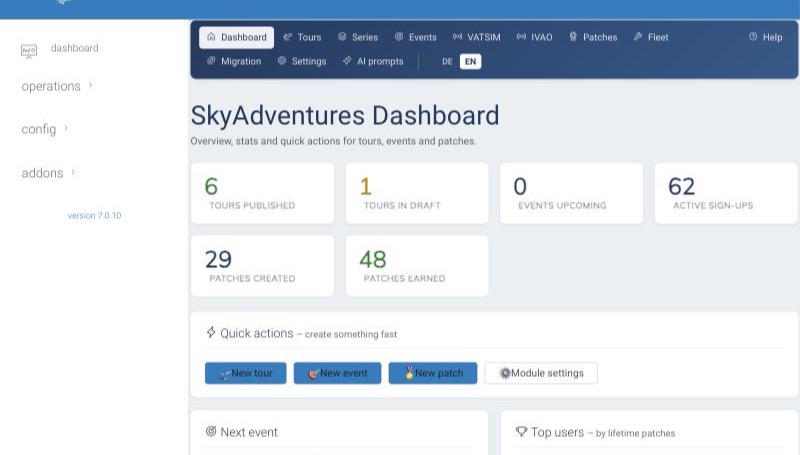
One dashboard with quick actions: new tour, new event, new patch, module settings. The top bar leads to tours, series, events, VATSIM and IVAO import, patches, fleet, migration, settings and AI prompts. The interface switches between German and English.
Was ihr verwaltet
SkyAdventures-Admin
Ein Dashboard mit Schnellaktionen: neue Tour, neues Event, neuer Patch, Modul-Einstellungen. Die obere Leiste führt zu Touren, Serien, Events, VATSIM- und IVAO-Import, Patches, Flotte, Migration, Einstellungen und KI-Prompts. Die Oberfläche lässt sich zwischen Deutsch und Englisch umschalten.
The tour editor
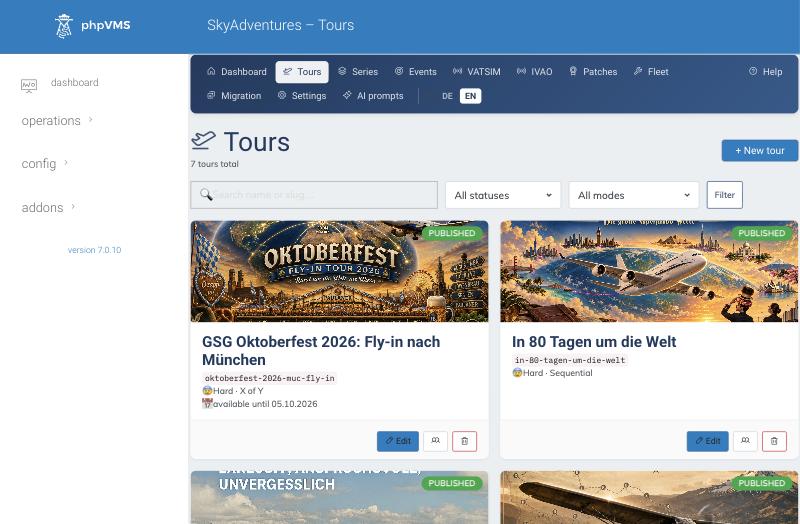
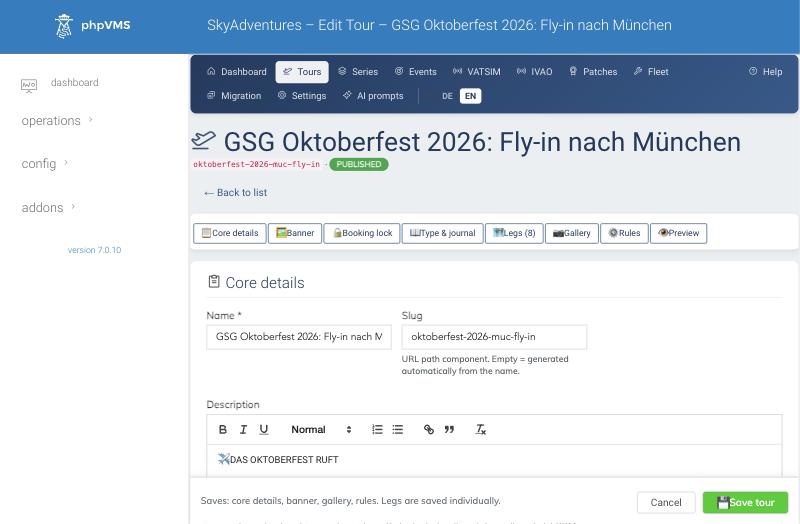
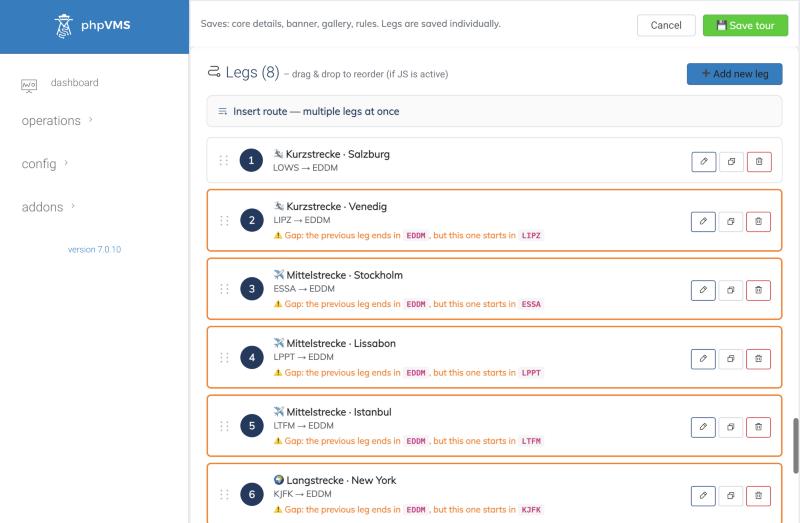
One editor with tabs: core details, banner, booking lock, type and journal, legs, gallery, rules and a preview. Legs are saved individually, and you can insert a whole route from a chain of ICAO codes. Optional AI helpers write drafts for descriptions, briefings and leg stories; every text should be reviewed before publishing.
Der Tour-Editor
Ein Editor mit Reitern: Stammdaten, Banner, Buchungs-Sperre, Typ und Reisetagebuch, Etappen, Galerie, Regeln und Vorschau. Etappen werden einzeln gespeichert, und eine ganze Route lässt sich aus einer ICAO-Kette einfügen. Optionale KI-Helfer schreiben Entwürfe für Beschreibungen, Briefings und Etappen-Geschichten; jeder Text sollte vor dem Veröffentlichen geprüft werden.
PaxStudio admin
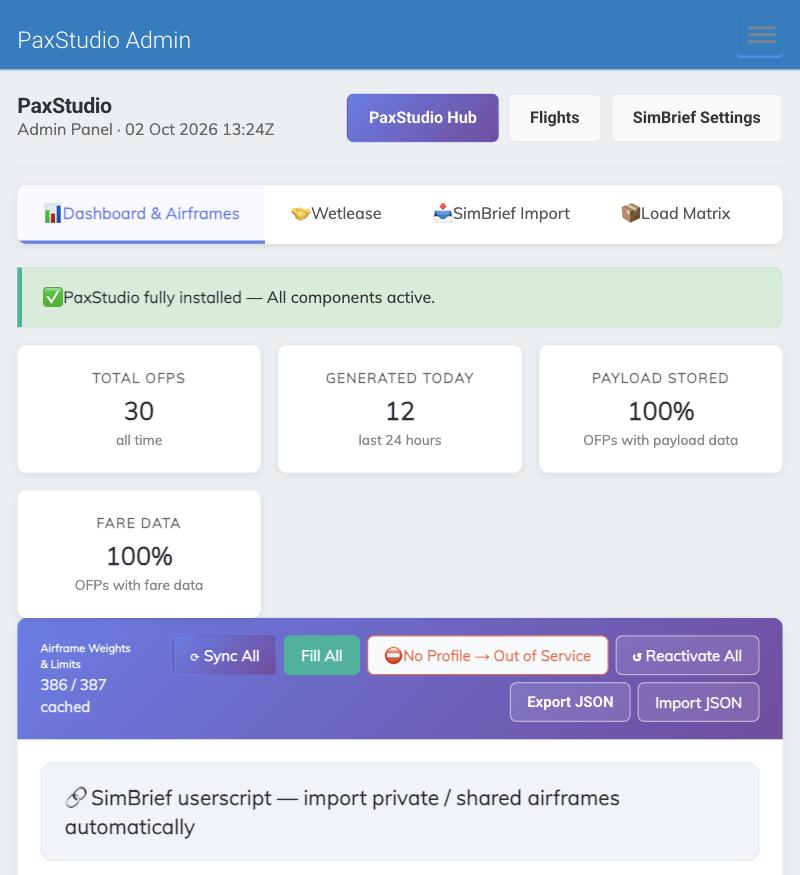
Four tabs: dashboard and airframes, wetlease, SimBrief import (the switch for importing own OFPs) and load matrix. The dashboard shows how many flight plans were generated and whether the aircraft weights are complete.
PaxStudio-Admin
Vier Reiter: Dashboard und Airframes, Wetlease, SimBrief-Import (der Schalter für eigene OFPs) und Load-Matrix. Das Dashboard zeigt, wie viele Flugpläne erzeugt wurden und ob die Flugzeuggewichte vollständig sind.
Requirements
Voraussetzungen
Both modules
- phpVMS 7 (Laravel), PHP 8.1 or newer
- Works with SPTheme, Seven, Disposable and other Bootstrap 5 themes
- Install as a normal phpVMS module (ZIP), then clear caches
Beide Module
- phpVMS 7 (Laravel), PHP 8.1 oder neuer
- Läuft mit SPTheme, Seven, Disposable und anderen Bootstrap-5-Themes
- Als normales phpVMS-Modul (ZIP) installieren, danach Caches leeren
PaxStudio only
- A SimBrief API key (phpVMS admin, settings, SimBrief)
- A profile field “SimBrief Username” for every pilot
- Optional: a profile field for SELCAL
- Aircraft weights are best kept in your fleet module
Nur PaxStudio
- Ein SimBrief-API-Schlüssel (phpVMS-Admin, Einstellungen, SimBrief)
- Ein Profilfeld „SimBrief Username“ für jeden Piloten
- Optional: ein Profilfeld für SELCAL
- Flugzeuggewichte pflegt man am besten im Flottenmodul
Both modules are maintained by German Sky Group and are available against a donation; ask us how. This guide shows the state of 2 October 2026 (SkyAdventures 0.68.2, PaxStudio 2.15.0); screenshots come from the live GSG system with the pilots’ names removed.
Beide Module werden von der German Sky Group gepflegt und gegen eine Spende abgegeben; sprecht uns an. Diese Anleitung zeigt den Stand vom 2. Oktober 2026 (SkyAdventures 0.68.2, PaxStudio 2.15.0); die Bilder stammen aus dem Live-System der GSG, Pilotennamen sind entfernt.
Getting this module
So bekommst du dieses Modul
This module is available against a donation. There is no fixed price. The way is the same for every donation module:
Dieses Modul gibt es gegen eine Spende. Es gibt keinen festen Preis. Der Weg ist für alle Spenden-Module derselbe:
- Contact Thomas on DiscordMessage
thomas_kant_38518and tell him which module you want. - Donate via PayPalSend your donation to
cloud@kant.ovh, as PayPal “Friends”. - Add your GitHub user nameWrite your GitHub user name in the payment note, so we can match the payment to you.
- Auf Discord meldenSchreibt Thomas an:
thomas_kant_38518, und sagt ihm, welches Modul ihr wollt. - Per PayPal spendenSchickt eure Spende an
cloud@kant.ovh, als PayPal „Friends“ (Freunde). - GitHub-Benutzernamen angebenSchreibt euren GitHub-Benutzernamen in den Verwendungszweck, damit wir die Zahlung euch zuordnen können.