SkyOps
Read-only operations center for phpVMS 7: PIREPs, fleet, pilot statistics, airline health and a departure board.
Betriebszentrale für phpVMS 7, nur lesend: PIREPs, Flotte, Pilot-Statistik, Airline-Gesundheit und eine Abflugtafel.
What it is
Was es ist
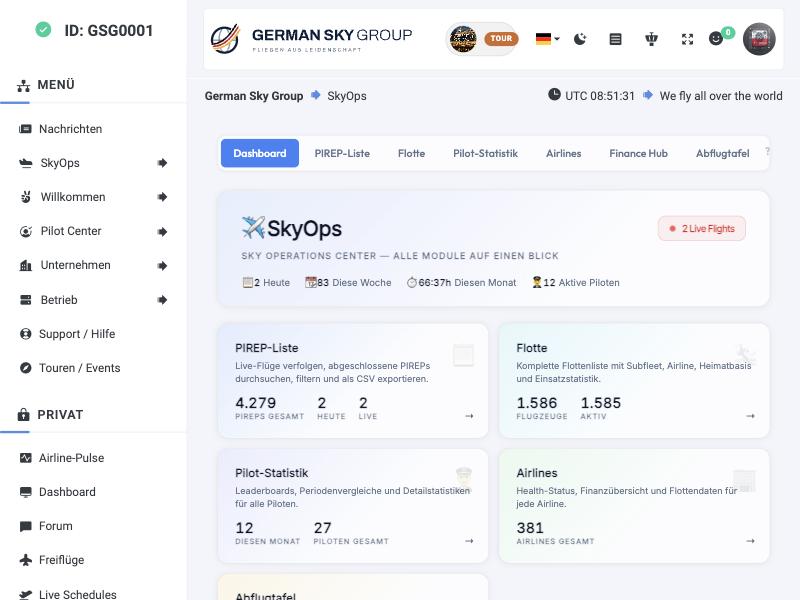
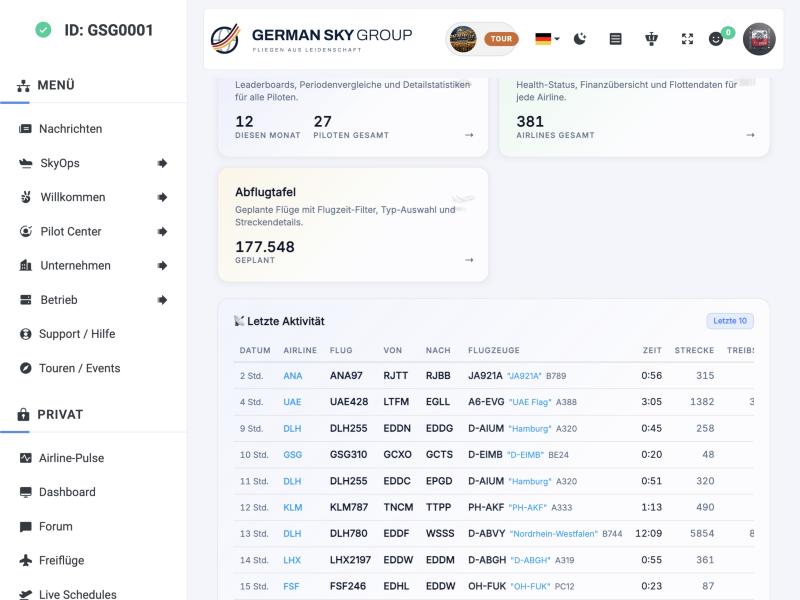
SkyOps is an operations center for staff and pilots. Seven pages show PIREPs, fleet, pilot statistics, airlines, a departure board and a built-in guide. Like Airline Pulse it is strictly read-only: no new tables, no migrations, it never writes to your database.
SkyOps ist eine Betriebszentrale für Staff und Piloten. Sieben Seiten zeigen PIREPs, Flotte, Pilotenstatistik, Airlines, eine Abflugtafel und eine eingebaute Anleitung. Wie Airline Pulse arbeitet es ausschließlich lesend: keine neuen Tabellen, keine Migrationen, es schreibt nie in eure Datenbank.
PIREP list
PIREP-Liste
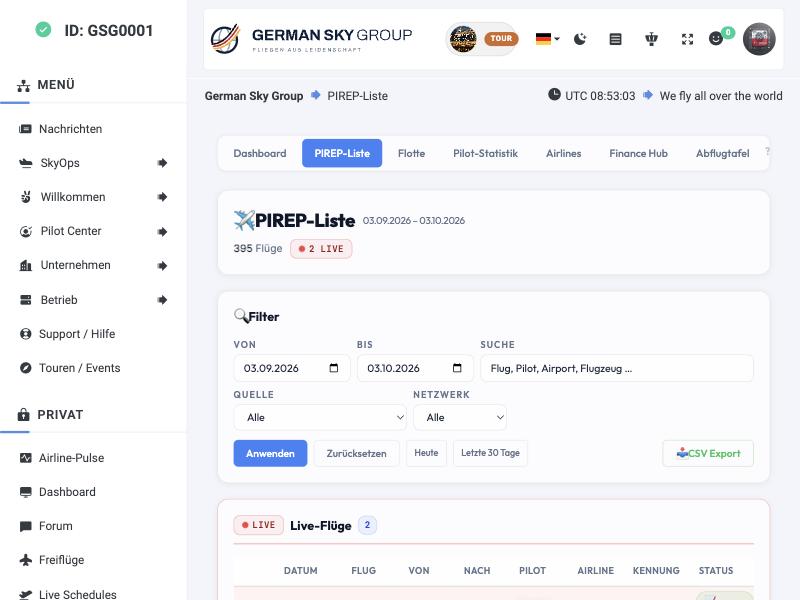
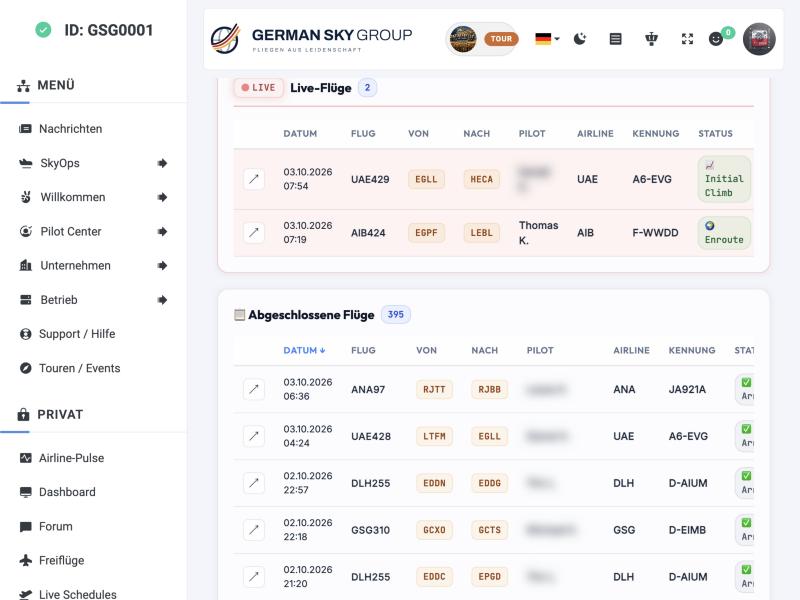
Live flights are listed on top, completed flights below. Filters cover date range, source (ACARS client), network and free text; a quick button picks “today” or “last 30 days”. An export button downloads the filtered list as CSV, if the admin allows it.
Oben stehen die Live-Flüge, darunter die abgeschlossenen Flüge. Filter gibt es für Zeitraum, Quelle (ACARS-Client), Netzwerk und Freitext; ein Schnellknopf wählt „Heute“ oder „Letzte 30 Tage“. Ein Export-Knopf lädt die gefilterte Liste als CSV, sofern der Admin es erlaubt.
Fleet and departures
Flotte und Abflugtafel
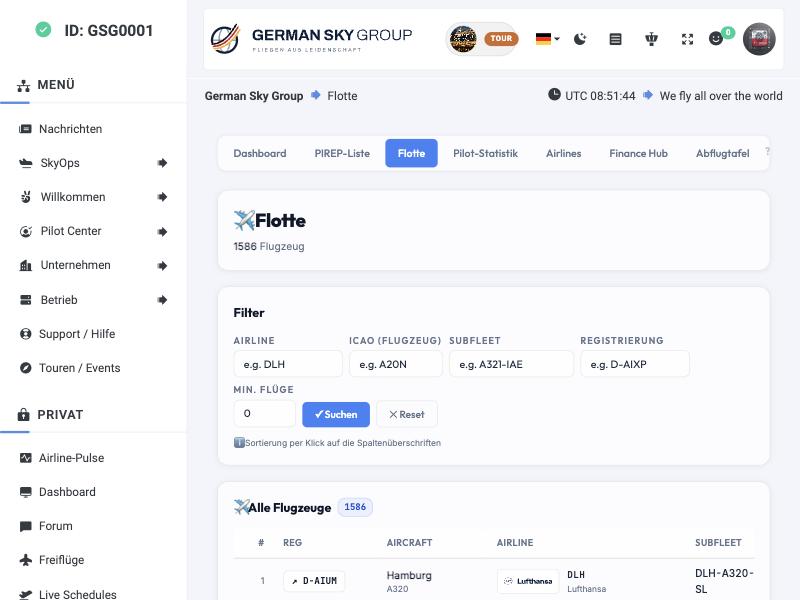
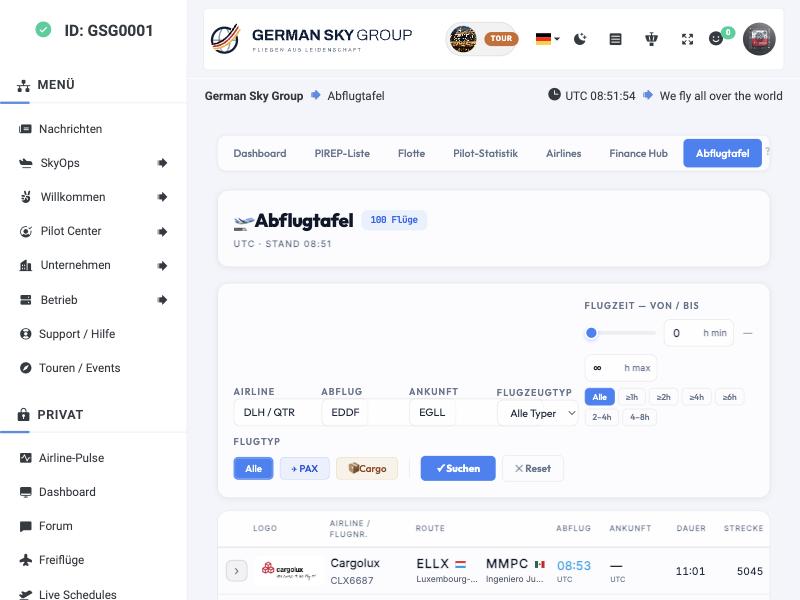
The fleet page lists every aircraft with registration, type, airline, subfleet, home base, status badge, number of flights and total hours; columns sort with a click. The departure board shows scheduled flights with filters for airline, airport, flight type (passenger or cargo) and aircraft type, plus a flight-time slider.
Die Flottenseite listet jedes Flugzeug mit Kennzeichen, Typ, Airline, Subfleet, Heimatbasis, Statusabzeichen, Zahl der Flüge und Gesamtstunden; Spalten sortieren per Klick. Die Abflugtafel zeigt geplante Flüge mit Filtern für Airline, Flughafen, Flugtyp (Passagier oder Fracht) und Flugzeugtyp, dazu einen Flugzeit-Schieberegler.
Pilot statistics and airlines
Pilot-Statistik und Airlines
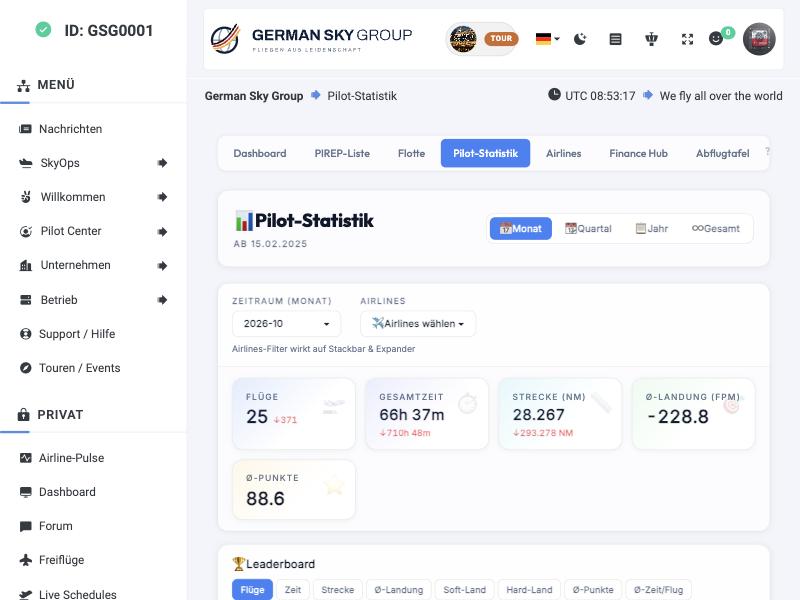
Pilot statistics compare month, quarter, year and all time, with KPI tiles and trend arrows (flights, total time, distance, average landing rate, average points) and a leaderboard that can be sorted by flights, time, distance, landing rate, soft or hard landings. The name display is configurable and privacy-aware: full name, short name, callsign or ID.
Die Pilot-Statistik vergleicht Monat, Quartal, Jahr und Gesamt, mit Kennzahlen-Kacheln und Trendpfeilen (Flüge, Gesamtzeit, Strecke, Ø-Landerate, Ø-Punkte) und einem Leaderboard, das sich nach Flügen, Zeit, Strecke, Landerate, weichen oder harten Landungen sortieren lässt. Die Namensanzeige ist einstellbar und datenschutzbewusst: voller Name, Kurzname, Rufzeichen oder ID.
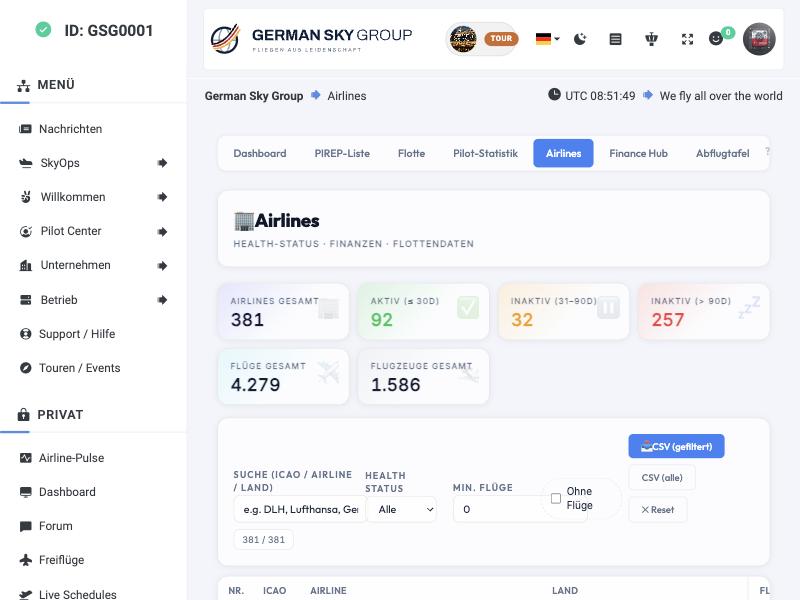
The airlines page grades every airline by activity: active (30 days), inactive (31–90) and dormant (more than 90 days), plus revenue, expenses, balance and fleet size. At GSG 92 of 381 airlines are active.
Die Airline-Seite bewertet jede Airline nach Aktivität: aktiv (30 Tage), inaktiv (31–90) und ruhend (über 90 Tage), dazu Umsatz, Ausgaben, Saldo und Flottengröße. Bei der GSG sind 92 von 381 Airlines aktiv.
The tab bar also links the Finance Hub of the DynamicFares module (see the DynamicFares page).
Die Reiterleiste verlinkt außerdem den Finance Hub des Moduls DynamicFares (siehe Seite DynamicFares).
The guide inside the module
Die Anleitung im Modul
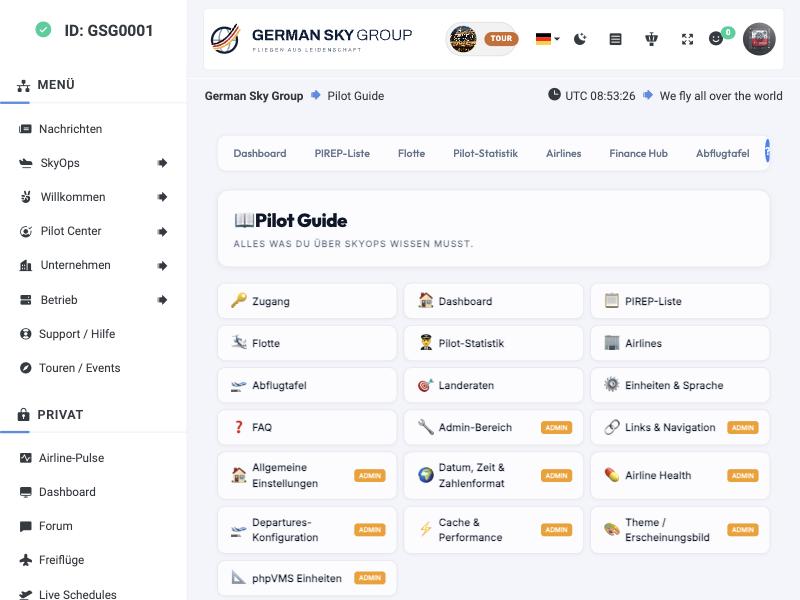
A guide page explains every page, the units, the landing-rate colours and a FAQ. Administrators additionally see the live configuration and sections for general settings, date and number formats, airline health rules, the departure board setup, cache, theme and units.
Eine Guide-Seite erklärt jede Seite, die Einheiten, die Landerate-Farben und enthält eine FAQ. Administratoren sehen zusätzlich die aktuelle Konfiguration und Abschnitte zu Grundeinstellungen, Datums- und Zahlenformaten, Airline-Gesundheitsregeln, Abflugtafel-Einrichtung, Cache, Theme und Einheiten.
Installation and settings
Installation und Einstellungen
| Step | What to do |
|---|---|
| 1 | Download the latest release from GitHub, copy the folder SkyOps to modules/. |
| 2 | Admin → Addons → Modules: enable SkyOps. |
| 3 | Open /update once to clear the config cache. |
| 4 | Open /skyops. Done. |
| Schritt | Was zu tun ist |
|---|---|
| 1 | Aktuelles Release von GitHub laden, den Ordner SkyOps nach modules/ kopieren. |
| 2 | Admin → Addons → Modules: SkyOps aktivieren. |
| 3 | /update einmal aufrufen, um den Config-Cache zu leeren. |
| 4 | /skyops aufrufen. Fertig. |
All settings live in one file, modules/SkyOps/Config/config.php. A module update does not overwrite it. There you set cache time per page (3–15 minutes), the name display, the CSV export (admin only, all users or off), glass or solid look, language and number formats. Requirements: phpVMS 7, PHP 8.1 or newer, no extra Composer packages; MySQL, PostgreSQL and SQLite are supported.
Alle Einstellungen stehen in einer Datei, modules/SkyOps/Config/config.php. Ein Modul-Update überschreibt sie nicht. Dort stellt ihr Cache-Zeit je Seite (3–15 Minuten), Namensanzeige, CSV-Export (nur Admin, alle Nutzer oder aus), Glas- oder Vollfarben-Look, Sprache und Zahlenformate ein. Voraussetzungen: phpVMS 7, PHP 8.1 oder neuer, keine zusätzlichen Composer-Pakete; MySQL, PostgreSQL und SQLite werden unterstützt.